Yahoo Ad Platforms SSP
Evolving Yahoo’s Supply Side Ad Tech Platforms
Yahoo (Oath, Verizon) SSP
Yahoo
Principal Product Designer
Ad Tech
Concept Diagrams, User Research Documentation, Business Process Flows, User Flows & Wireframes / UI Design
The Assignment: Ad Platforms Supply-Side Consolidation
Challenge
The team has been tasked with consolidating all supply-side ad platforms into a single, omni-channel SSP - how do we do this in a way that serves the business and our users
Solution
The Product Design team will work together closely with Product Management, Engineering, business stakeholders, and UX Research, to plan, design, develop, test, and roll out a new single, omni-channel SSP
Ad Platforms Supply Side Consolidation - Merging All Platforms into a Single, Omni-Channel SSP
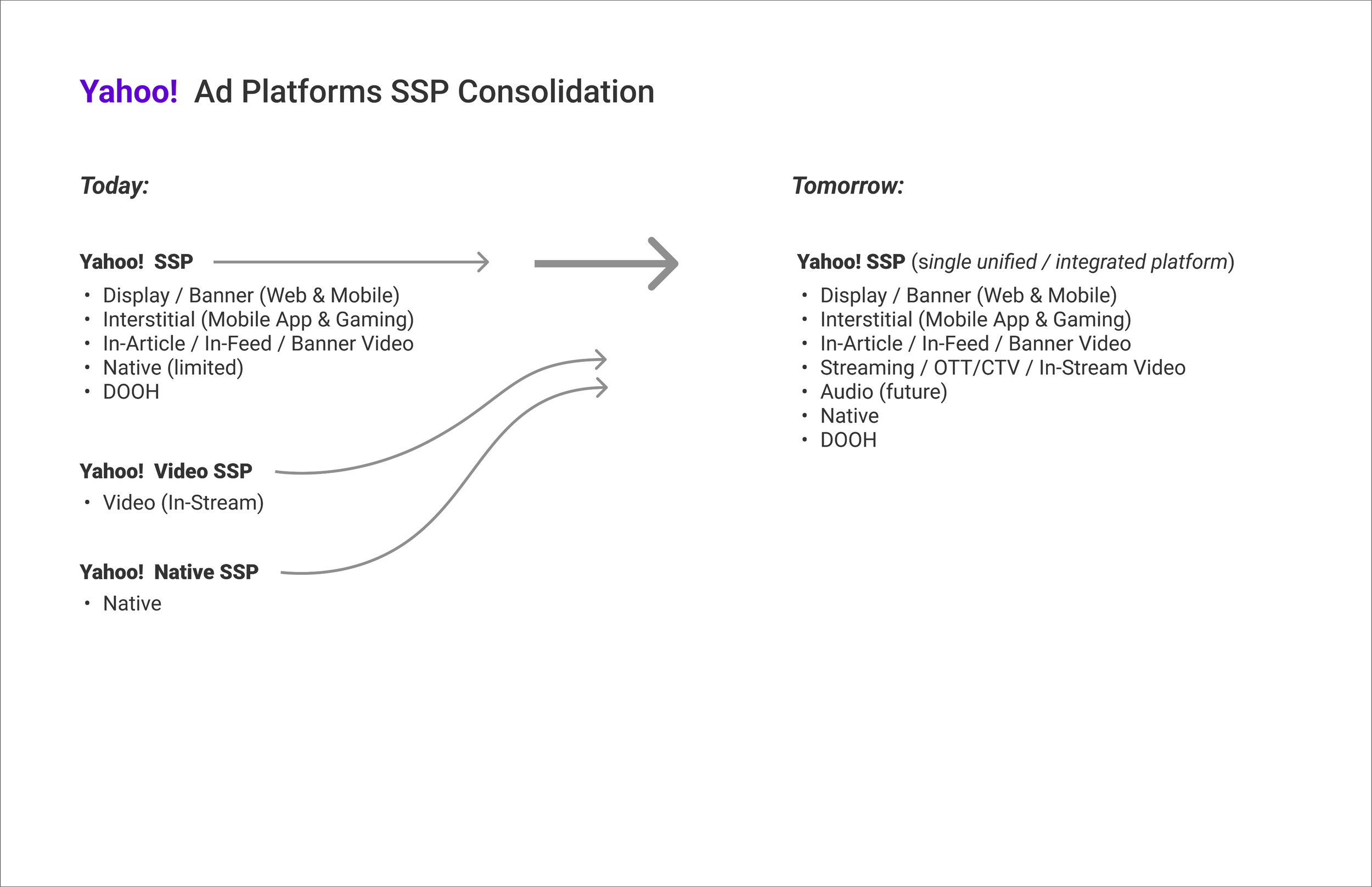
Today’s suite of supply side platforms (SSPs) are broken out roughly by client industry, and inventory and media type.
Our platform architectures, UIs, and overall product experiences today reflect a long history of on-going legacy acquisitions, mergers, and product migrations and integrations over many years, as well as on-going product evolution and innovation, in keeping with the needs of the rapidly changing industry.
In the coming quarters, we will be working together with Product, Engineering, Research, business stakeholders, and more, to consolidate all of today’s supply-side ad platforms into a future, single, omni-channel SSP.
Concept Diagram
User Experience Strategy & Planning: Merging Inventory, Users, Navigation, Workflows, and UIs
Challenge
In our effort to consolidate supply-side ad platforms, how do we bring together different inventory models, business segments and users, navigation, workflows, and page UIs
Solution
Mapping our path to designing and delivering a successful, efficient, and unified, omni-channel SSP experience, and the user research, subject matter investigation, and UX/UI assessment (of current platform UIs), needed to get us there
User Experience Strategy & Planning

In the coming quarters, we will be working together with Product, Engineering, Research, business stakeholders, and more, to consolidate all of today’s supply-side ad platforms into a future, single, omni-channel SSP.
How will different inventory and media types, and their accompanying ad formats and placement types, be integrated in the new platform, in way that serves an omni-channel customer base of sellers?
How will today’s different inventory and placements navigation, creation and management workflows, and page features and UI design, be integrated in the new user experience and UI, in a way that best serves our users?
User Experience Research, Strategy & Design Planning - Workstreams & Activities
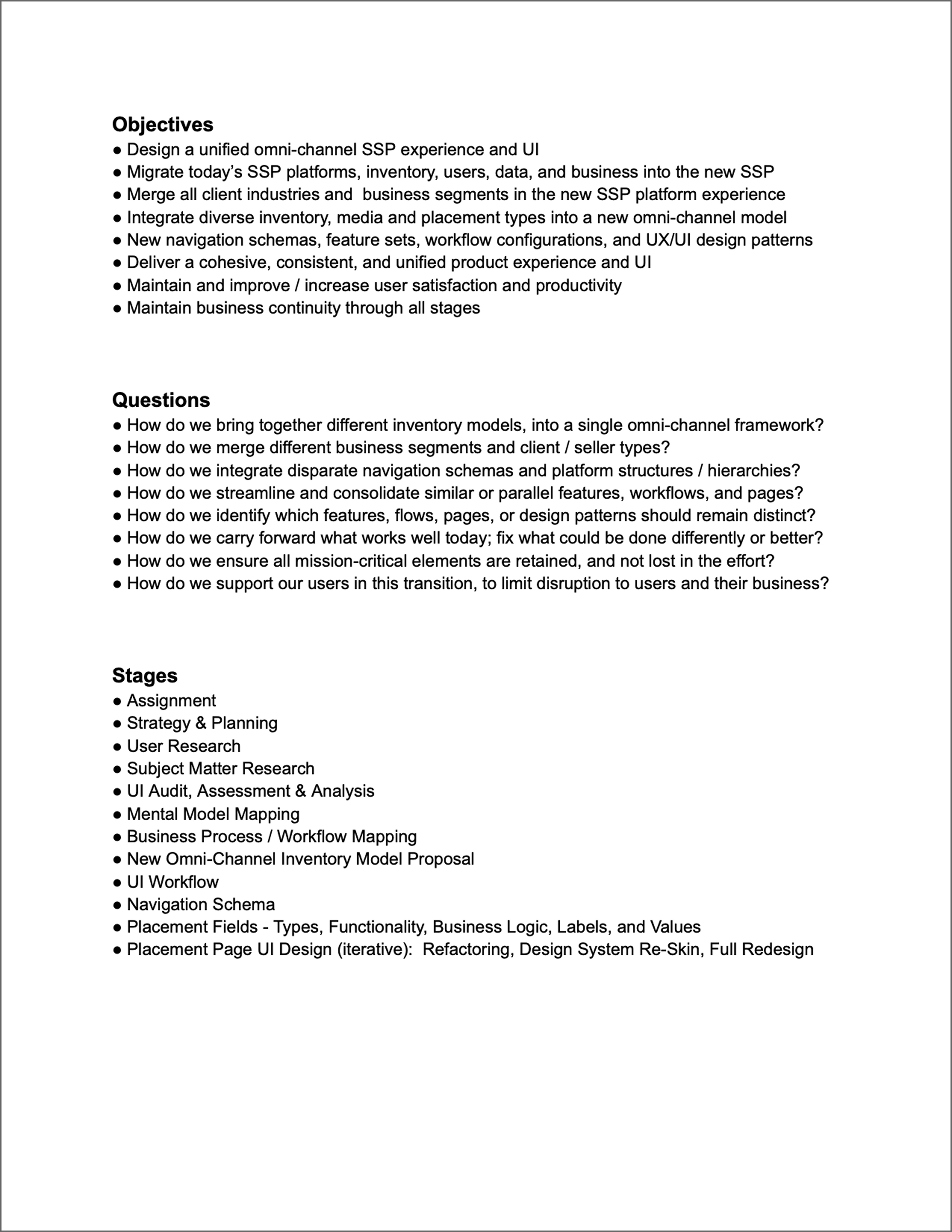
The project will migrate all our supply platforms - Display & Mobile, Video, Native, which also means all our client industry vertical, business or customer segments - Publisher, App Developer, Broadcaster, Native Pub, DOOH, and user types - ‘client’, ‘managed / internal’ into a single, unified, integrated SSP platform.
The project will include the integration of all of today’s inventory into a single, omni-channel ad inventory model, incorporating all media types, and ad formats and placement types.
The experience design integration effort will focus on navigation, workflows, and pages and UI features used to navigate, create, and edit/manage ad inventory - from the Seller / Publisher, to the Web or Mobile Site or App, to the individual Ad Placement / Unit - including attributes pertaining to inventory and placements such as Ad Format and Creative Specifications, Content/Context, and Bid Parameters.
For each workflow, page, or feature mentioned, we will retain the best examples of what works well today vs. where users face challenges or we see opportunities for improvement, and in the different platform UIs today, as well as pursue opportunities for evolution, enhancement, and change in the future supply UI.
User Experience Research, Strategy & Design Timeline
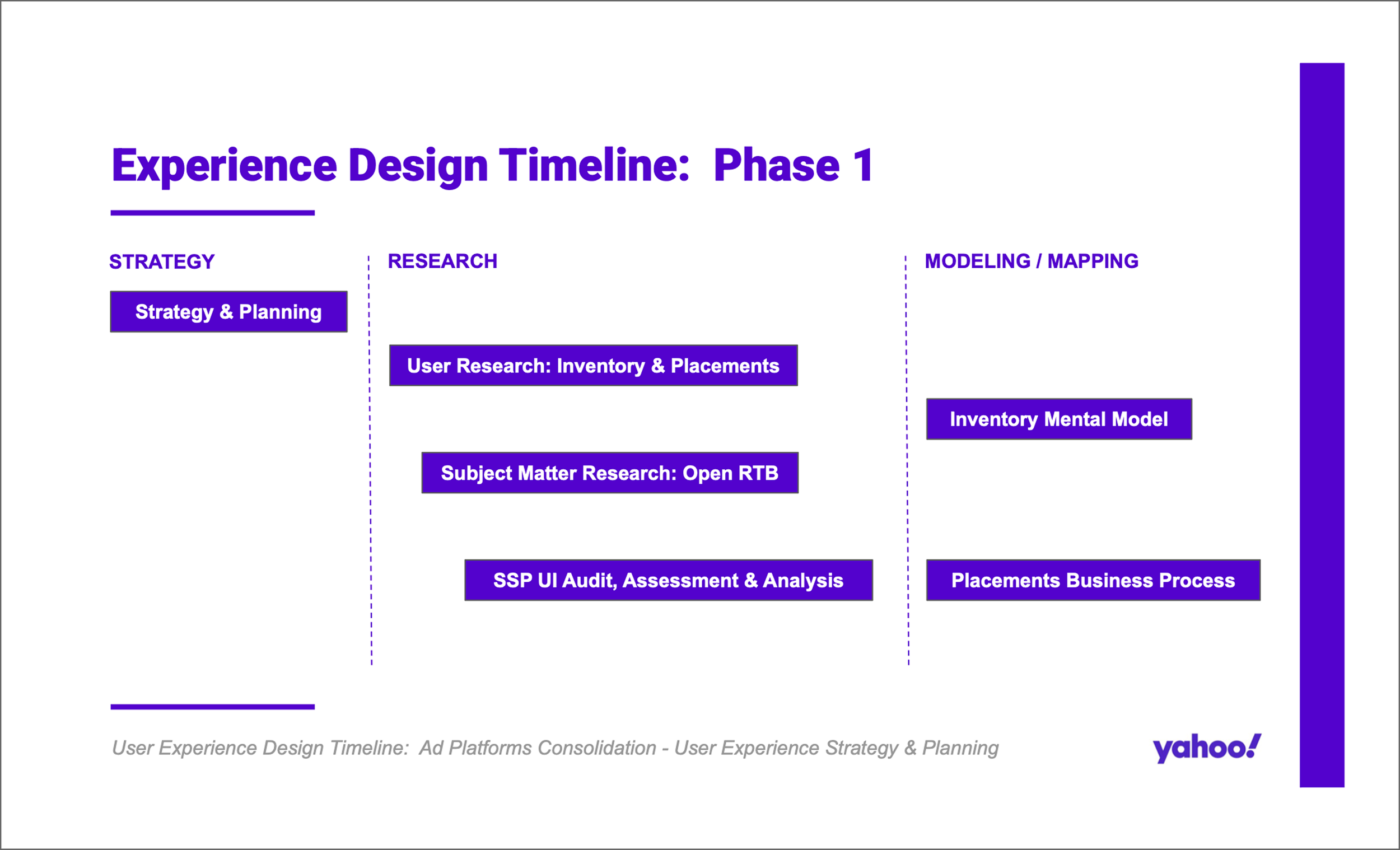
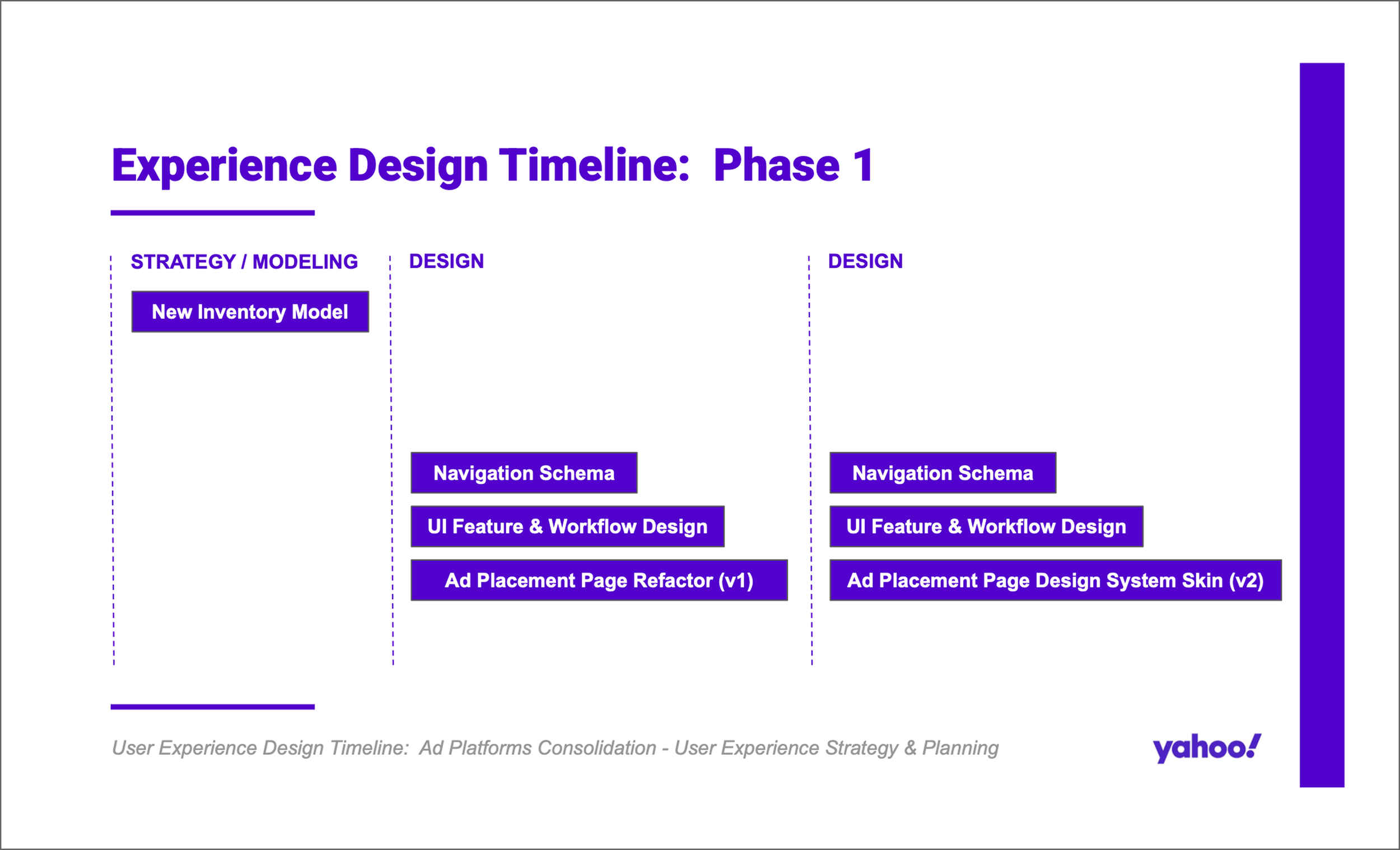
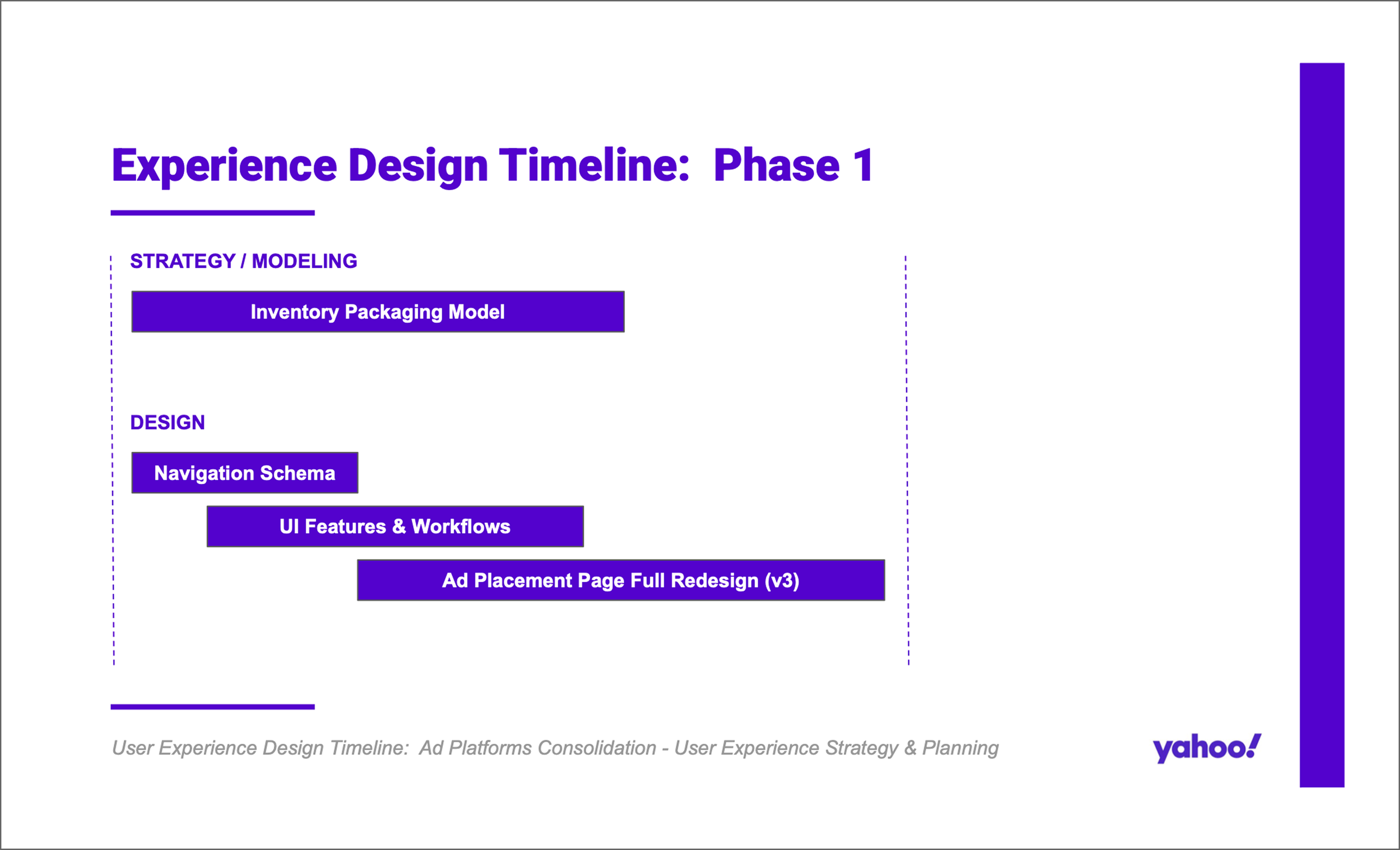
Timeline for strategy and planning, user research, subject matter research, and UX / UI audit of existing platform UIs - including navigation, workflows, and page layouts and UI design patterns. Followed by the mapping of user mental models and business processes for user inventory and placements. Culminating in the architecture of our new omni-channel inventory model, accompanying navigation schema, and redesigned workflows and page / UI pattern designs, for creating and managing / editing placements.
User Research Plan & Script, Research Data Spreadsheets, Research Findings Presentation
User Research: Consolidating Inventory & Placements
Challenge
In our effort to consolidate supply-side ad platforms, how do we migrate different inventory models and placements features - navigation, workflows, and page UIs - from today’s platforms into the new, omni-channel platform, to best serve users, and ensure essential items are retained
Solution
The UX research and design team conducted a research study to gather insights on how users engage with inventory and placements in SSP platforms today, which workflows, features, and UI elements work well and we should keep and build upon vs. which need to change, improve, or be removed, and if/how to best integrate all of these into the new unified, omni-channel platform experience
User Research Plan & Script

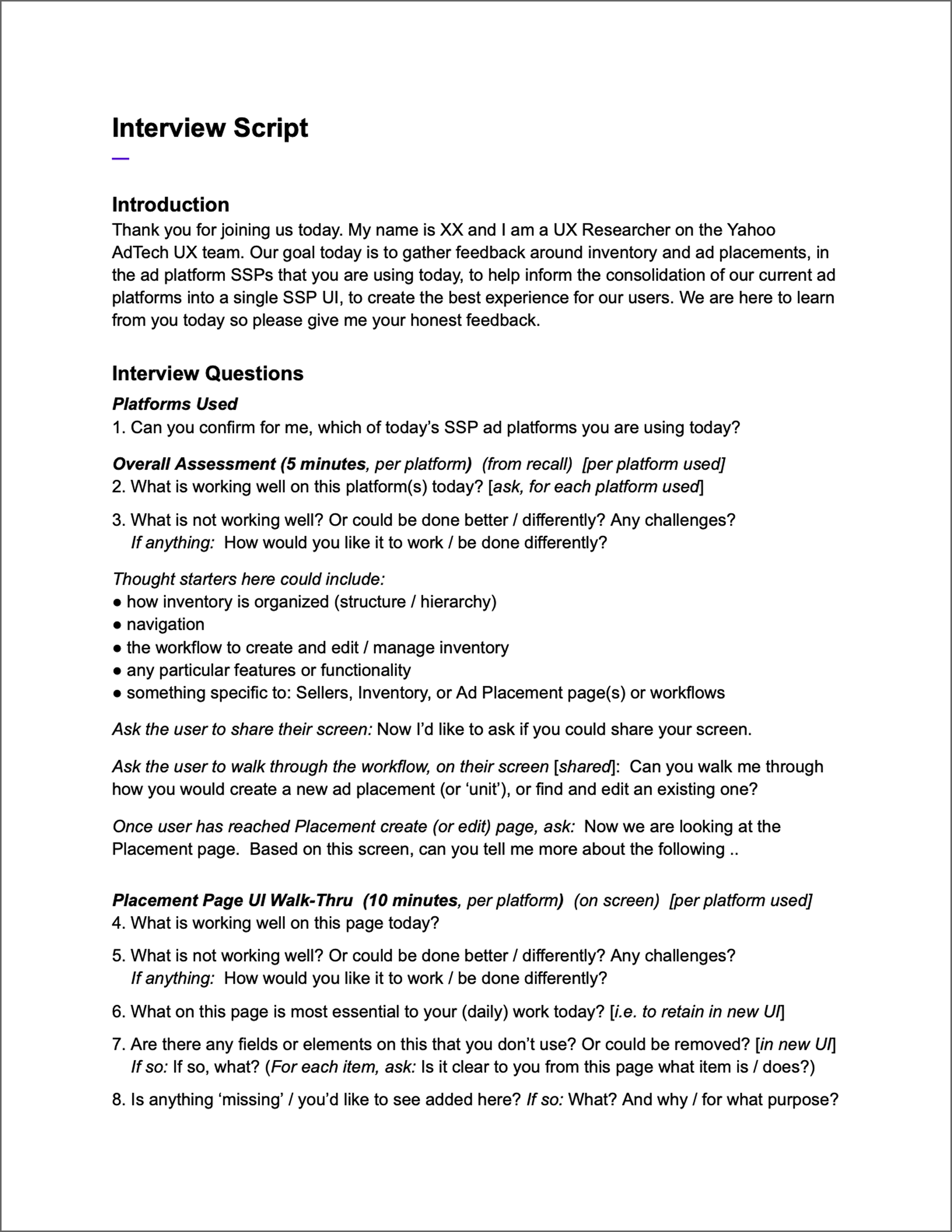
Research plan and interview script for user research study to see how users from each business segment or industry vertical engage with inventory and placements on each of our SSP ad platforms today, and how this differs by platform and/or by inventory, media, and placement type(s).
The goal for this study was to figure out how to best integrate different ad inventory models and ad placements features - navigation, workflows, and pages / UI elements - from each of today’s supply platforms into the new, omni-channel SSP platform, in order to meet our users’ (differing) needs, in the new platform experience.
User research sessions consisted of user interviews centered around a user-led UI walk-through of the current platform experience, with a focus on inventory and ad placements, accompanied by users’ narration of their interaction and engagement with the workflow and the UI - what works well, or not; what they use most frequently vs. what they never use; today’s challenges and opportunities. We also inquired about similarities and differences between supply platforms and inventory, media, and placement types, as well as what elements to retain vs. what to change or remove in the new UI.
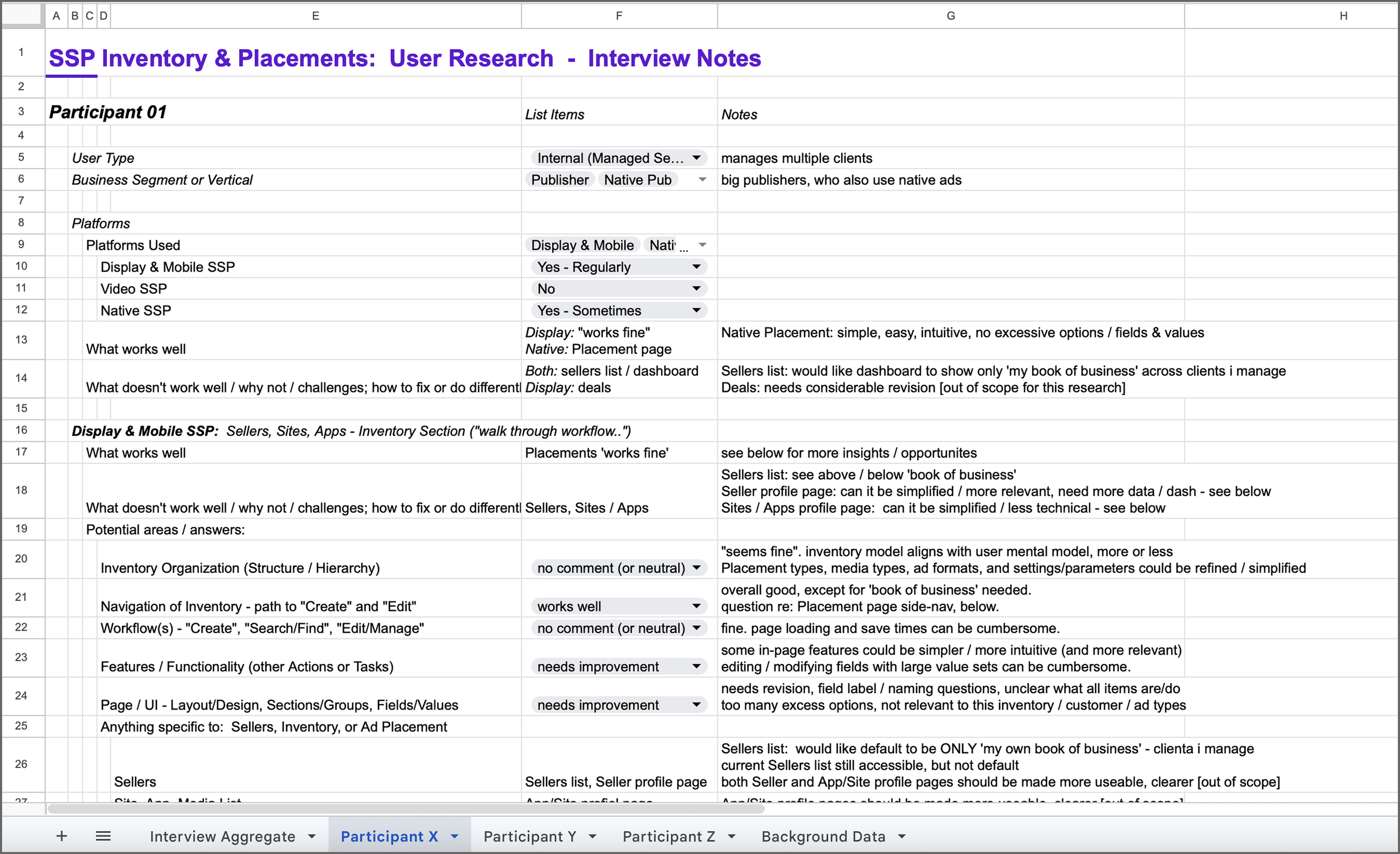
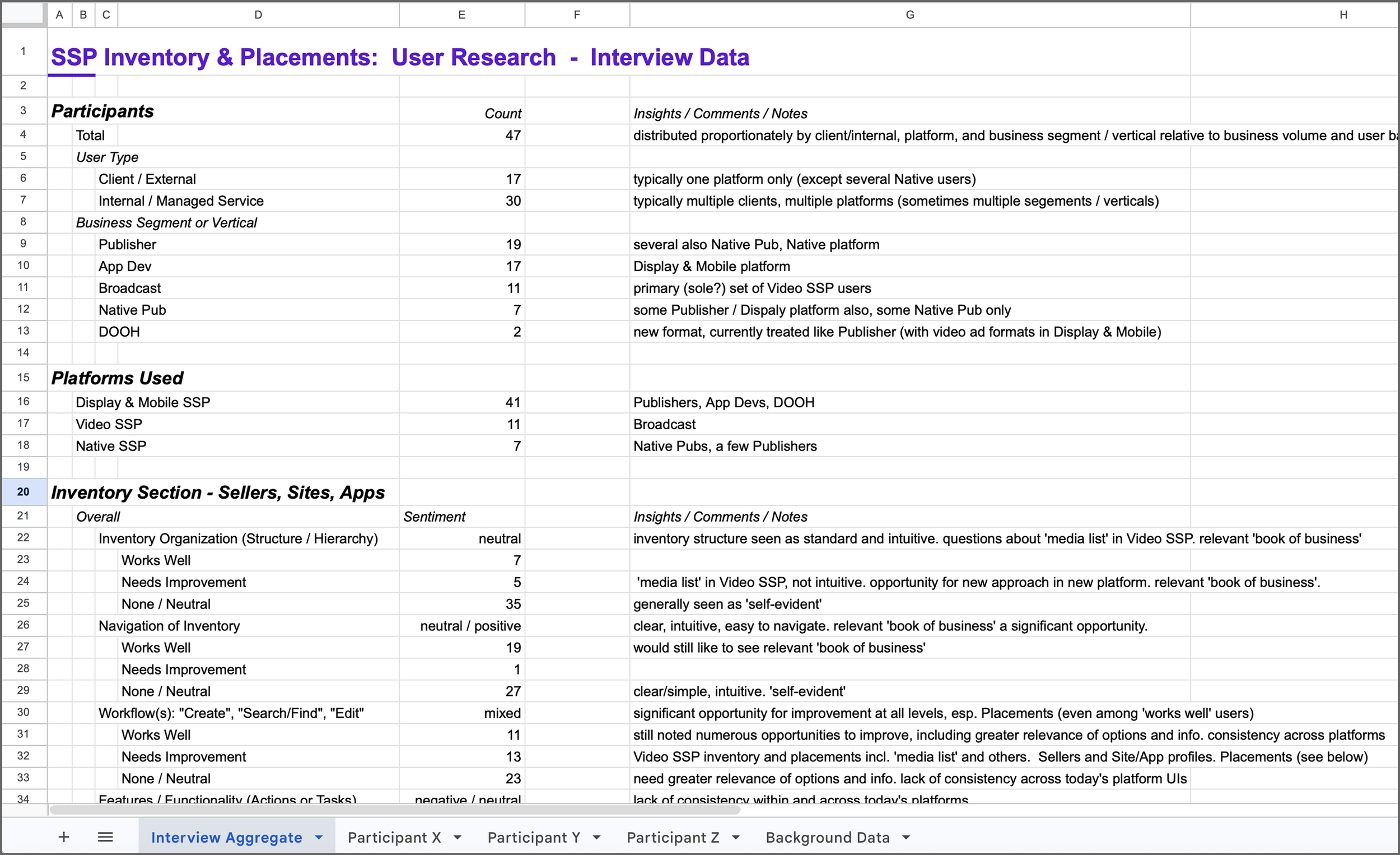
User Research Data - Individual Interview Participant & Aggregate Data
Research data for participant interviews from our user research study, including examples of both individual participant interview notes and the aggregate / summary overview.
Participants were selected to form a representative sampling of users from each supply platform - Display & Mobile, Video, Native, as well as industry vertical, business or customer segment - Publisher, App Developer, Broadcaster, Native Pub, DOOH, and user type - ‘client’, ‘managed / internal’. This included participants who used just one platform today, and those who used multiple platforms.
Research questions focused on user-reported understanding of ad inventory models, media types, and ad formats and placement types, across platforms and how users engaged with inventory and placements on each of our SSP ad platforms today.
The UI walk-through focused on navigation, workflows, and pages and UI features used to navigate, create, and edit/manage ad inventory - from the Seller / Publisher, to the Web or Mobile Site or App, to the individual Ad Placement / Unit - including attributes pertaining to inventory and placements such as Ad Format and Creative Specifications, Content/Context, and Bid Parameters.
For each workflow, page, or feature mentioned, we asked about user satisfaction, what worked well today vs. where users faced challenges or saw opportunities for improvement, and how experiences compared or contrasted (were similar or different) between the different platform UIs today, as well as opportunities for evolution, enhancement, and change in the future supply UI.
User Research Findings
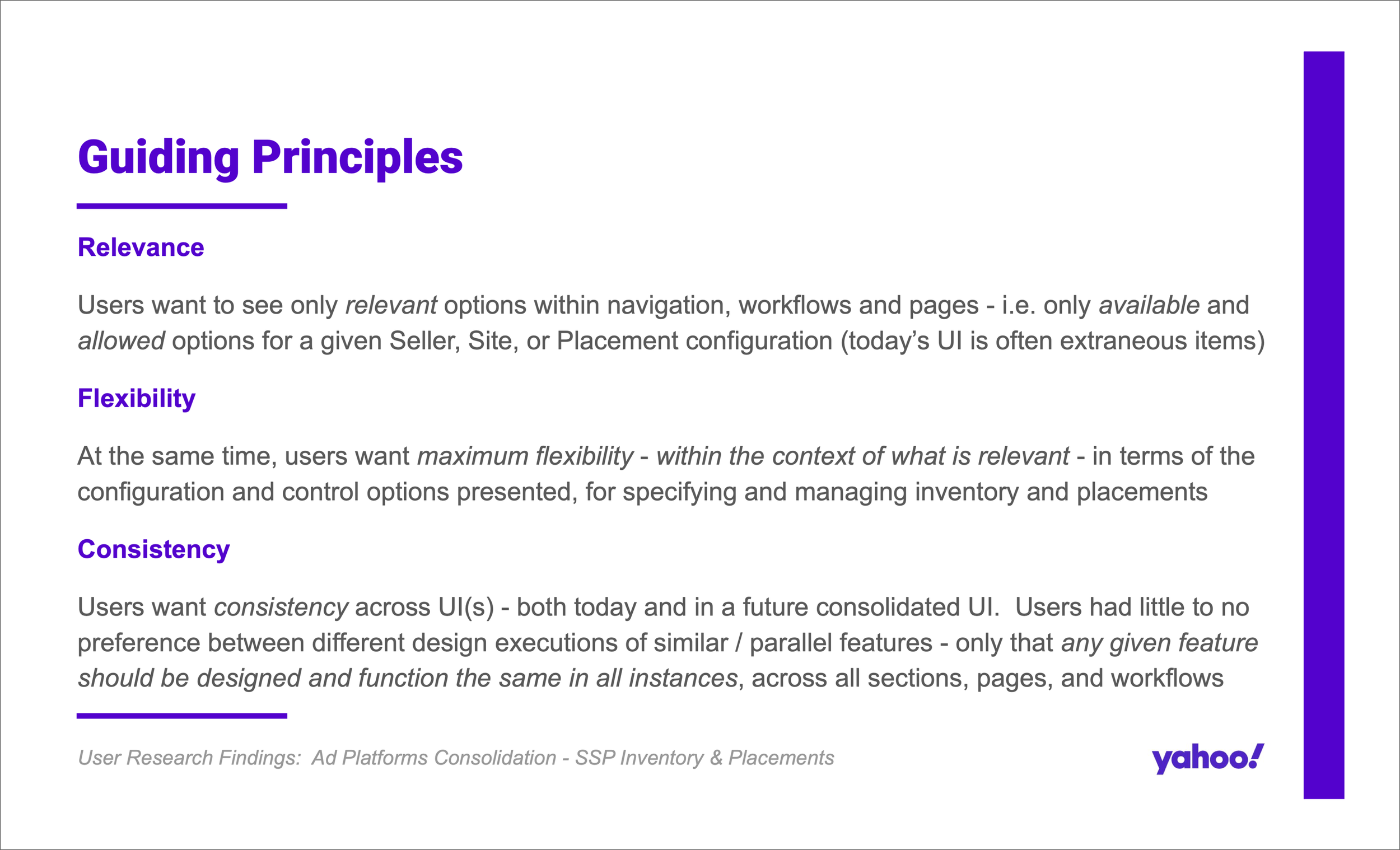
Top-level findings were that users prioritized 3 main aspects in today’s UI / experience, as well as in their hopes and expectations for the new, consolidated UI: Relevance, Consistency, Flexibility.
User Research Plan & Script, Research Data Spreadsheets, Research Findings Presentation
Subject Matter Research: Unpacking & Operationalizing the OpenRTB Model
Challenge
Mining the OpenRTB BidRequest Specification for any insights from that perspective on how to best organize and categorize placement and inventory types in the UIs
Solution
Translating ad properties outlined in the OpenRTB ad placements specification into a working model that can be applied throughout platform UIs, databases, and workflows
OpenRTB API Spec Documentation
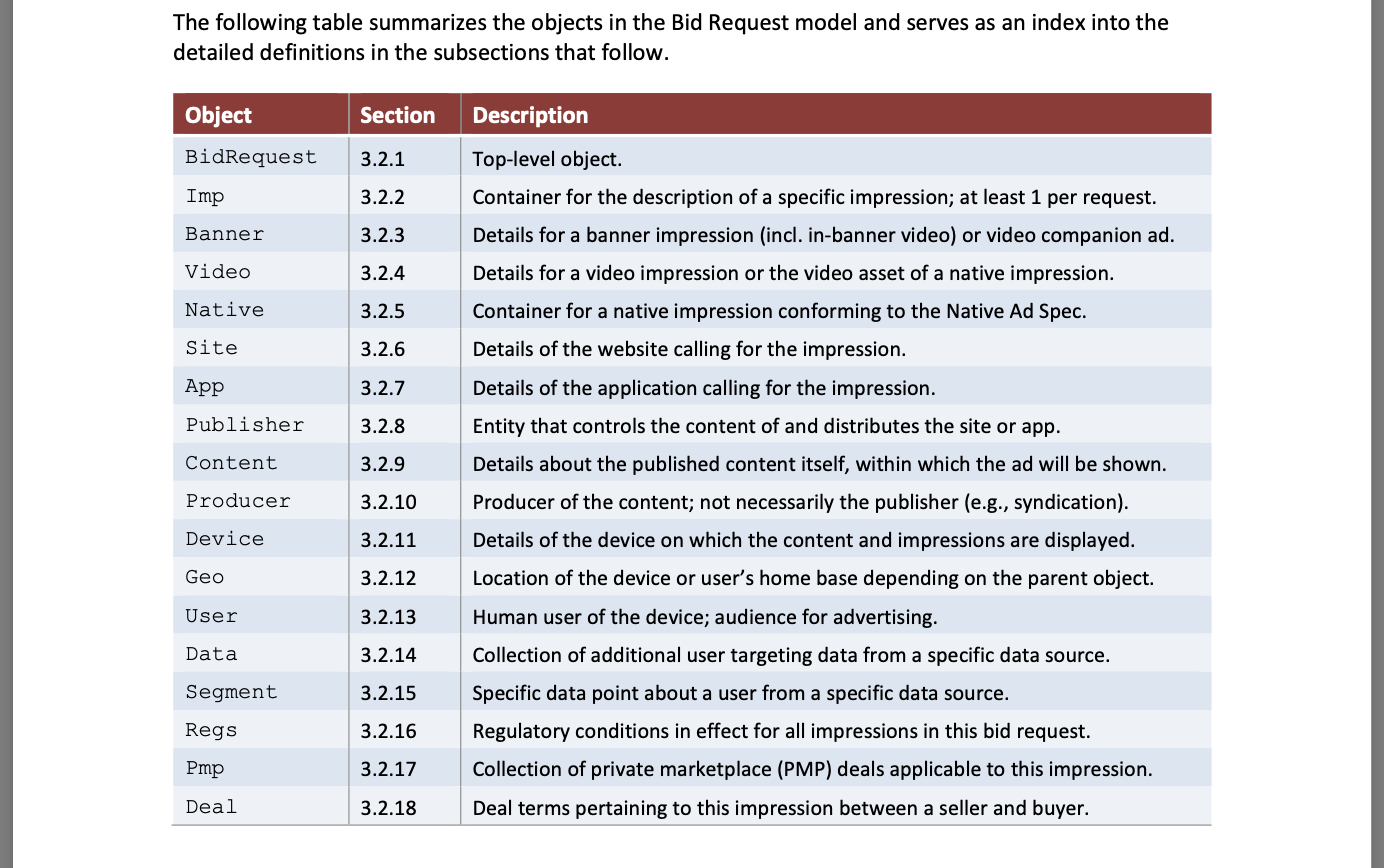
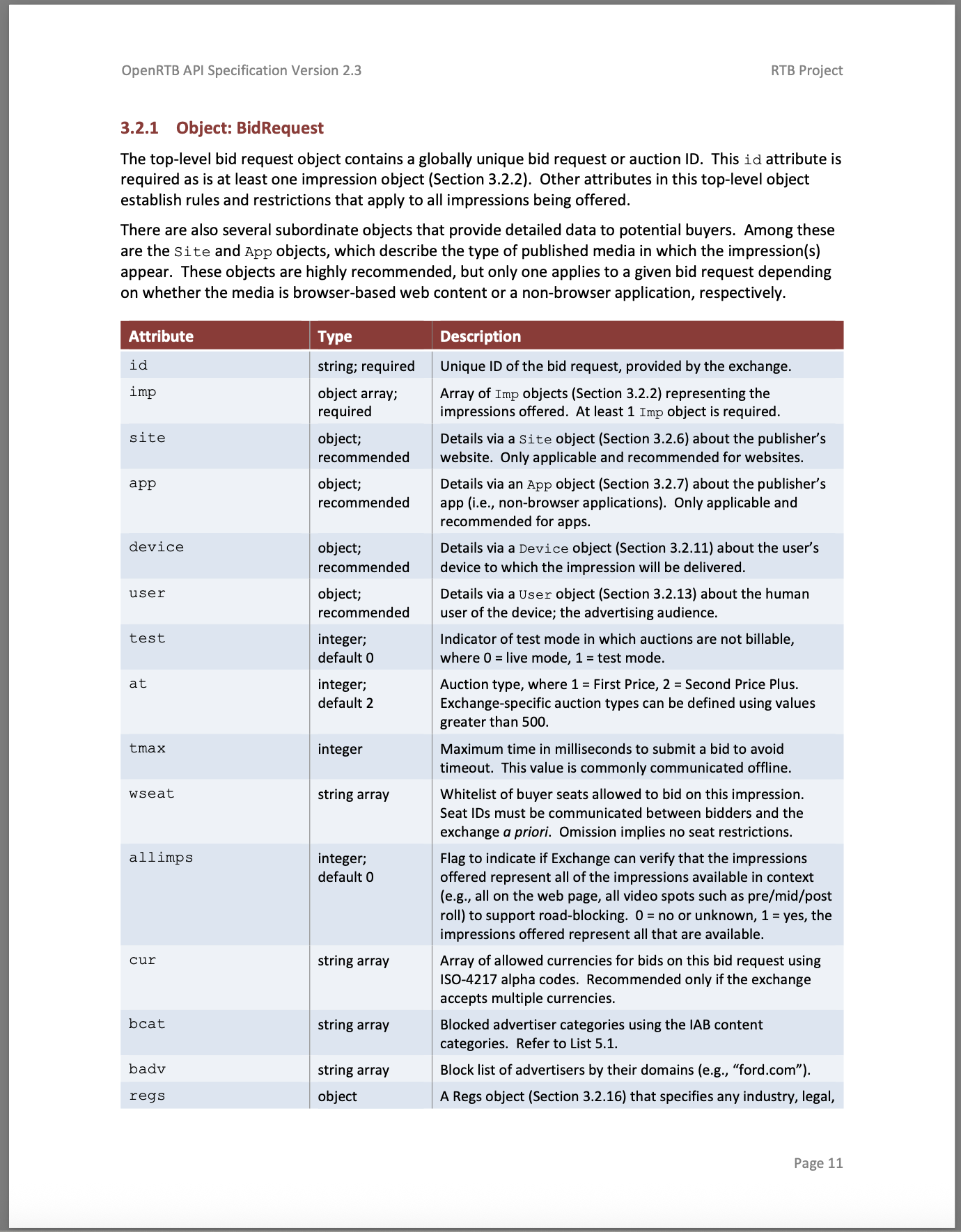
Source document for the Open RTB spec. Outlines the full object model for real-time bidding, including over 200 attributes pertaining to inventory and placements, used by ad tech platforms such as SSPs, DSPs, and Exchanges, to power programmatic ad transactions and delivery.
Attributes can be used to specify info about the Seller / Publisher, the Web or Mobile Site or App, and the individual Ad Placement / Unit, including Ad Format and Creative Specifications, Content/Context, and Bid Parameters.
OpenRTB Bid Request Model - Parsing the OpenRTB API Spec
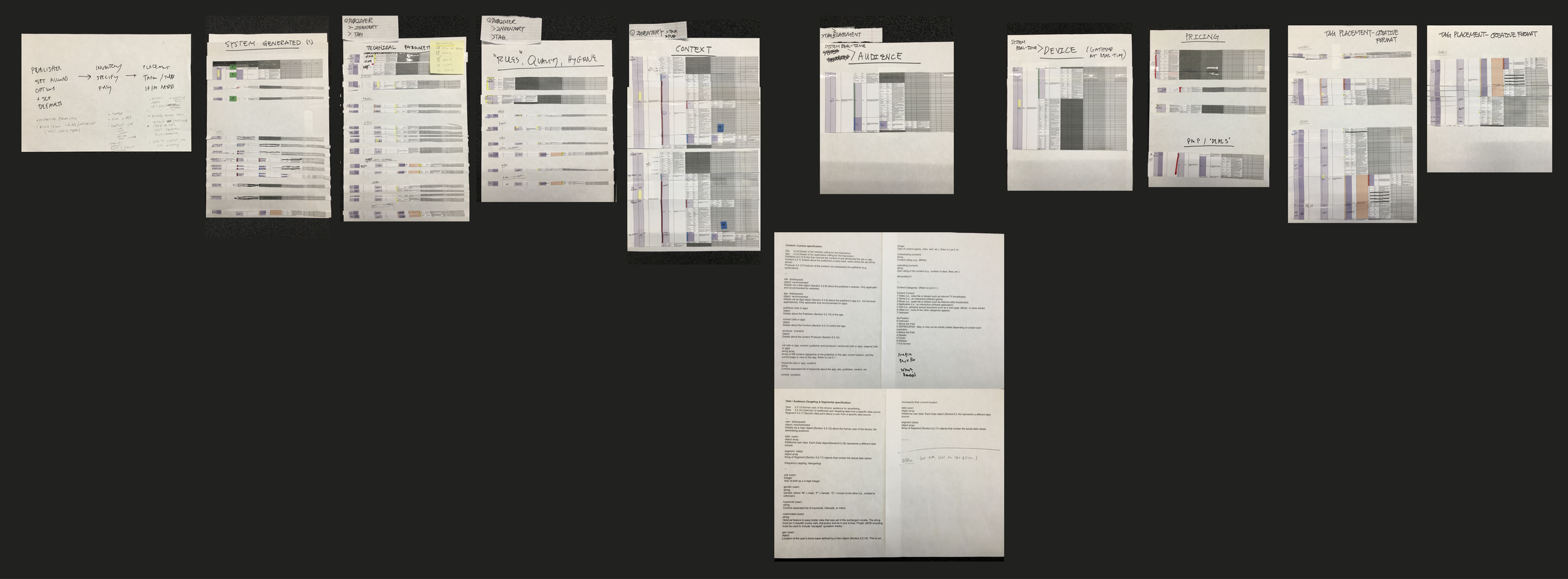
Parsing out relevant ad format and inventory attribute parameters from the bid model, grouping them according to their business (and technical) function and meaning to the user.
The goal of the exercise was to curate and categorize parameters and attributes heuristically based on our understandings from both users’ mental model insights and our deep-dive assessment of platform UIs and functionality (see below).
Categories range from the business-focused to the technical, including examples such as Technical Parameters, Rules/Quality, Context/Content, Audience, Device, Creative Format, and Pricing, among others. (photo of marked-up, cut/pasted printouts)
Mapping OpenRTB Parameters - Generating a Visual Inventory Model
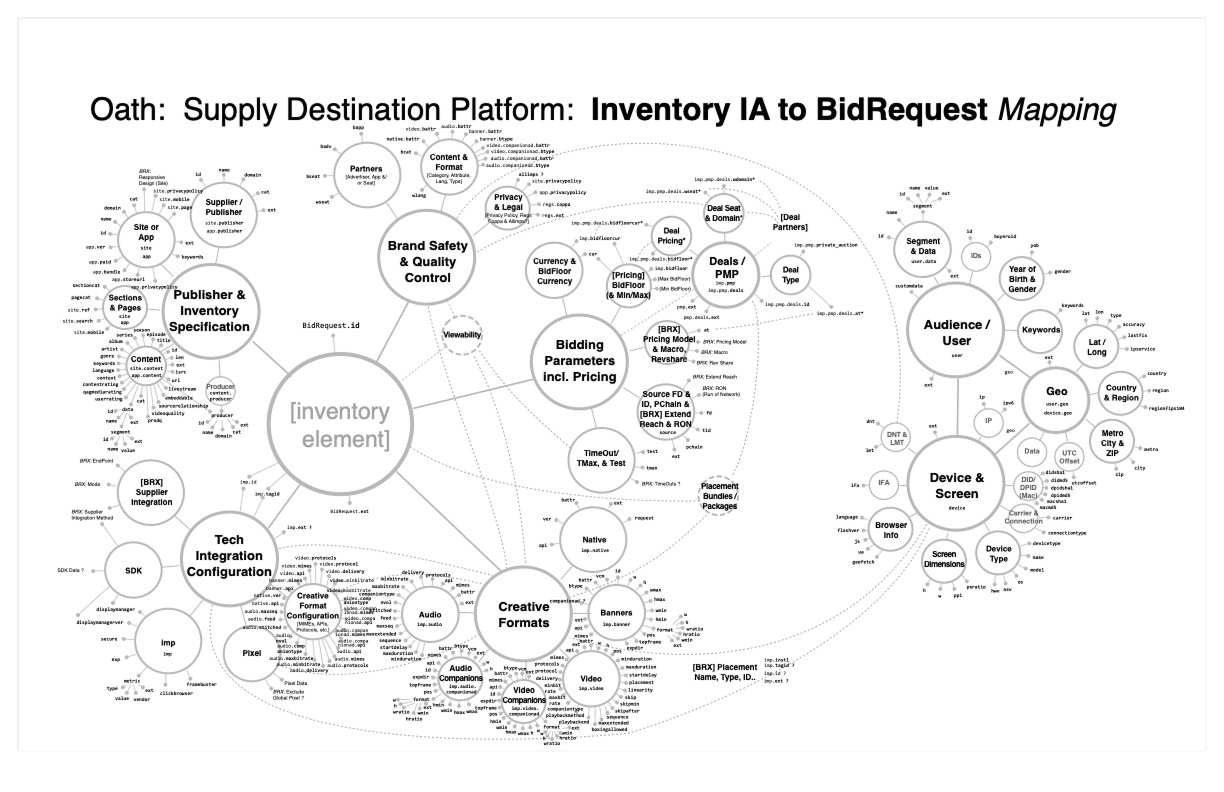
Bubble diagram - illustrating a comprehensive mapping of all inventory and ad placement parameters from the OpenRTB tech spec to develop a visual model for inventory and placements, that could be applied across ad formats ad platform UIs (and databases).
This model maps out all placement and inventory parameters, with attributes centered around business groupings and sub-grouping ‘bubbles’; groupings were derived heuristically from insights on users’ mental models, as well as analysis of inventory categories inherent in the various different inventory models within our current supply platforms.
All aspects of the ad placement definition and specification, including creative formats and bid parameters, are incorporated. This is meant for use as a baseline for re-architecting and refactoring such things as data field labels and groupings, safety and bidding controls, and UI groupings for the ad placement / unit entity within the diverse supply platform interfaces, data records, and workflows.
Concept & Taxonomy Diagrams
UX Audit, Assessment & Analysis: Inventory & Placements Navigation, Workflows, Pages & Fields in Supply UIs
Challenge
Formulating a path towards alignment and consistency across a very diverse array of ad tech platforms and UIs, media / inventory types, and ad placement formats; laying a foundation for the longer-term path towards consolidation and integration, into a single, omni-channel supply UI
Solution
Capturing and cataloguing all relevant ad placement and inventory parameters, data fields and values, and configuration controls from throughout relevant areas of all current ad platform UIs in a single index - covering all channels, inventory, media, and placement types, at all levels
Cataloguing Inventory Fields - from Sellers, Apps/Sites, Placement Pages, Deals UI, and Others
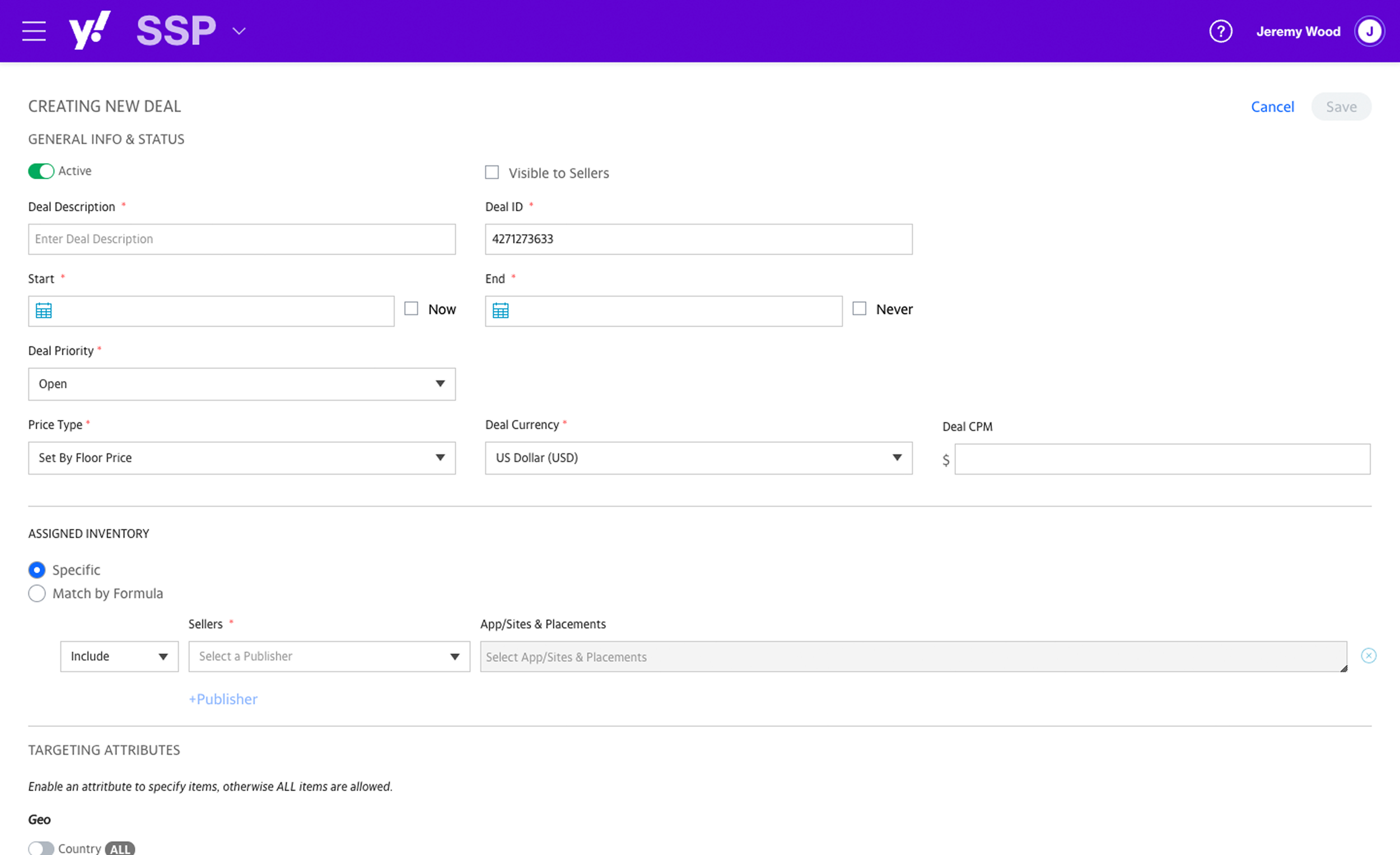
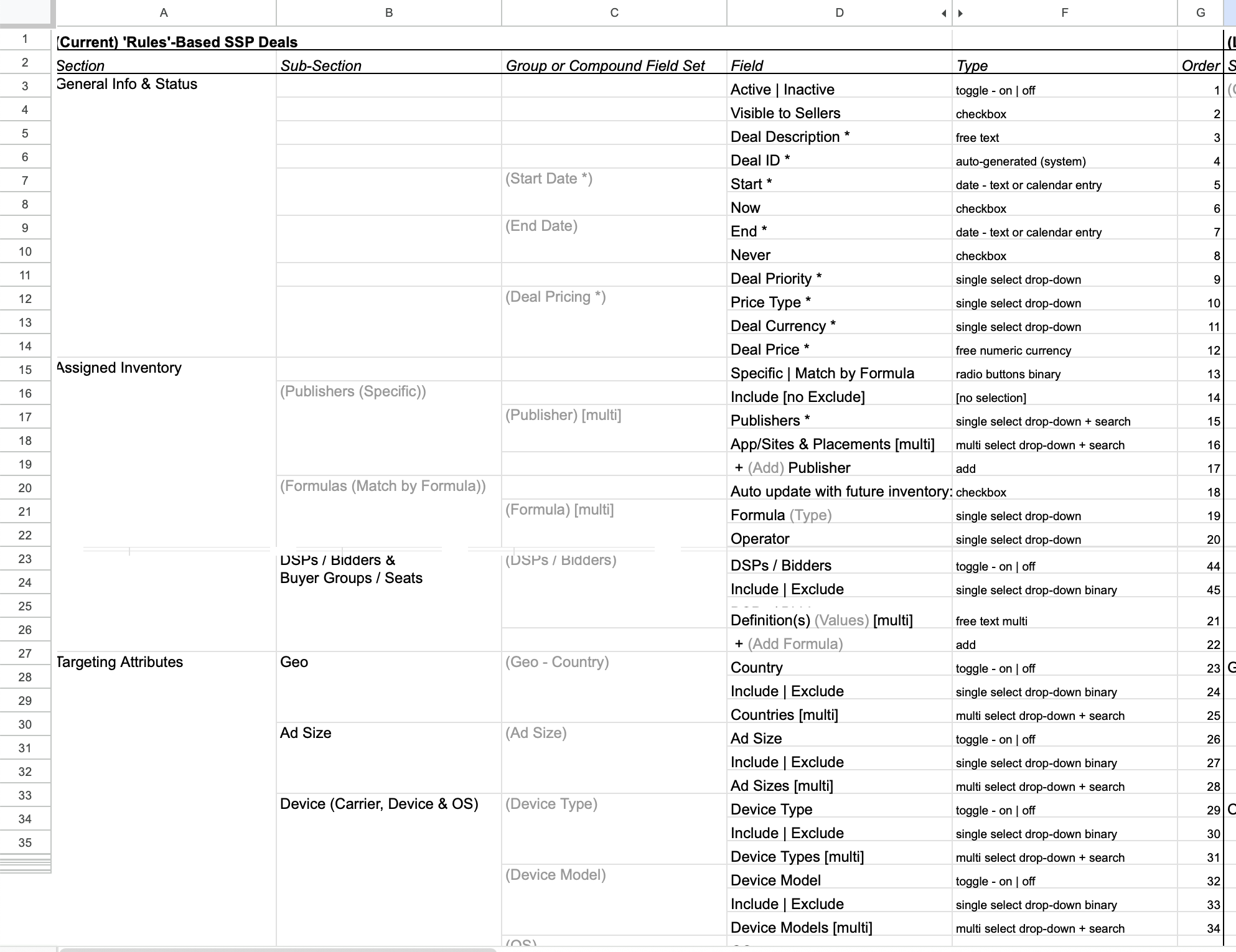
Capturing and indexing inventory-related data fields from all relevant pages within and across the different Supply platform UIs.
Identifying and documenting common or parallel (or contrasting / conflicting): sections, pages, features, patterns, forms, parameters, fields and values, and configuration settings - at all levels of inventory including Seller, App/Site, and Ad Placement/Unit.
Mapping each set of parallel or similar pages, features, and fields to one another, across platforms / UIs. (Deals page from SSP, with index spreadsheet, shown here)
Analyzing Inventory Fields - Teasing Out Relevant Fields & Values from Placement Page
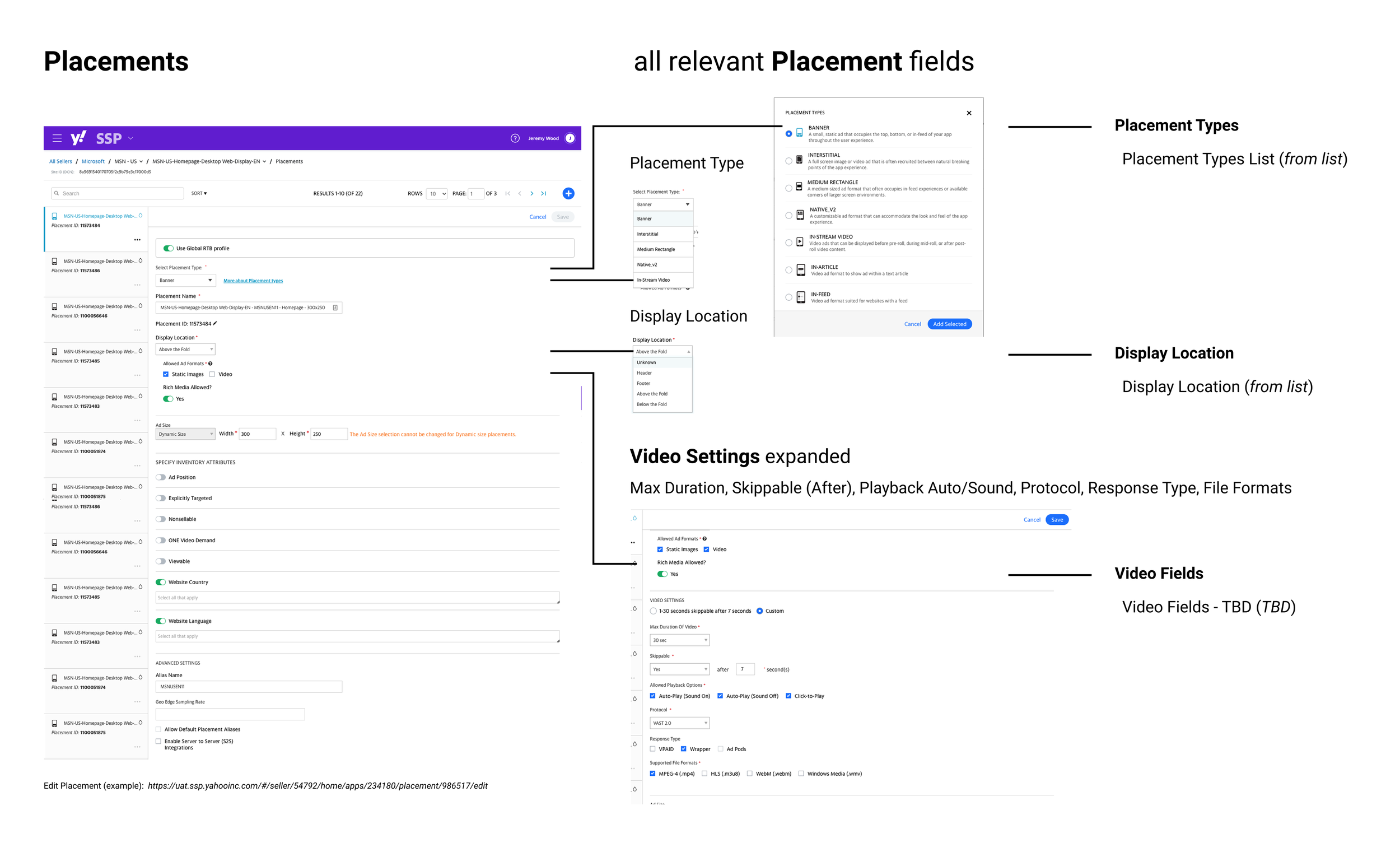
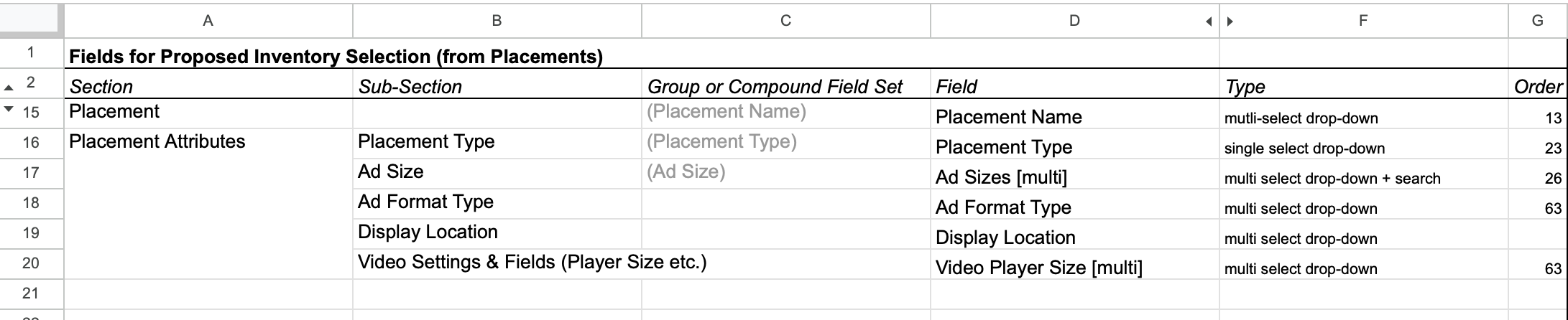
Teasing out relevant fields and values from SSP Placements from which to build out the new, omni-channel inventory model for all of Supply.
Together with the fields and learnings from the OpenRTB model, as well as insights from user mental model research, these will form the basis of our new, integrated, omni-channel inventory and ad placement model, for all of Supply. (Placement page from SSP, with spreadsheet index, shown here)
Analyzing Inventory Fields - Teasing Out Relevant Fields & Values from Deals Page
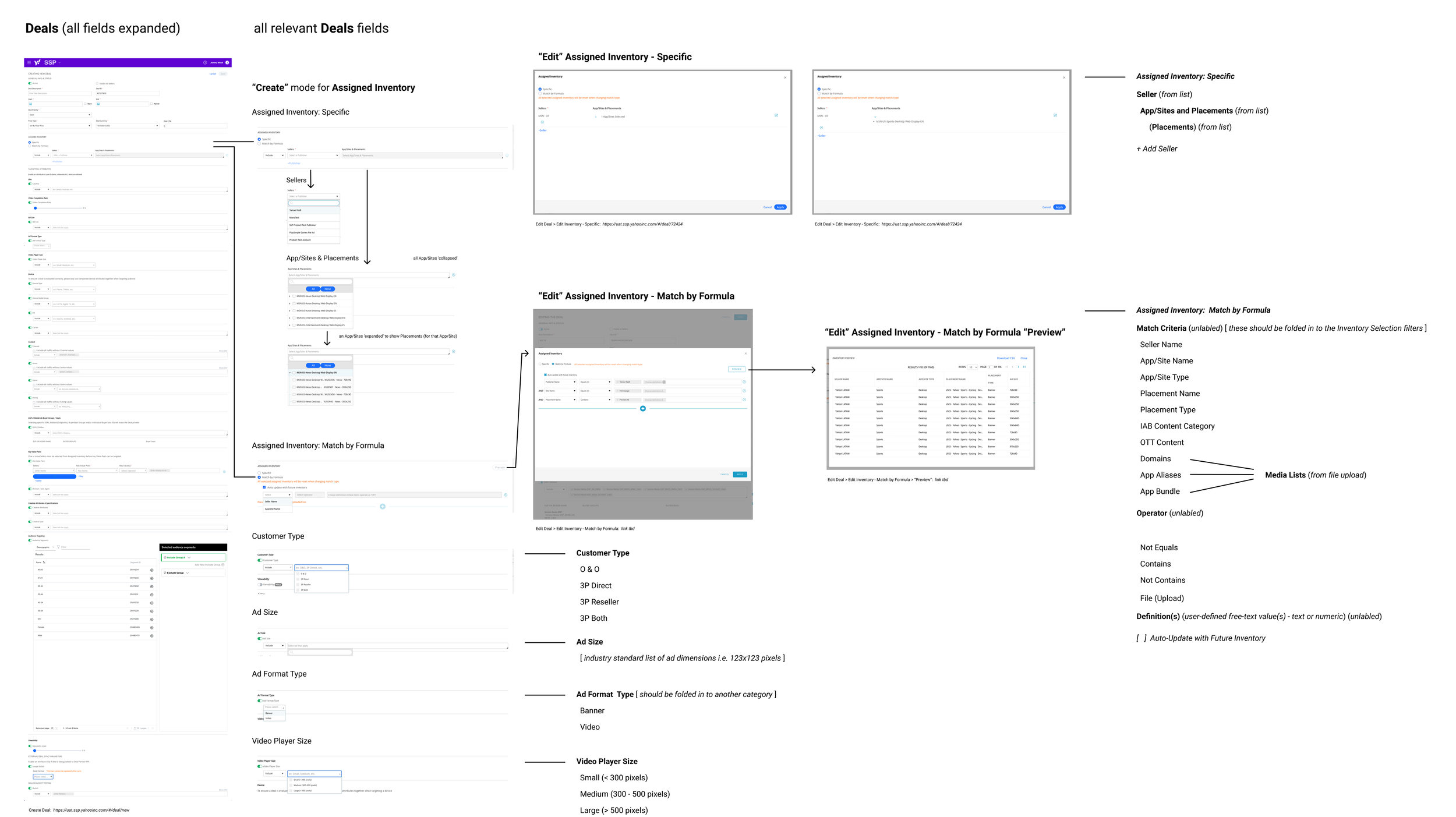
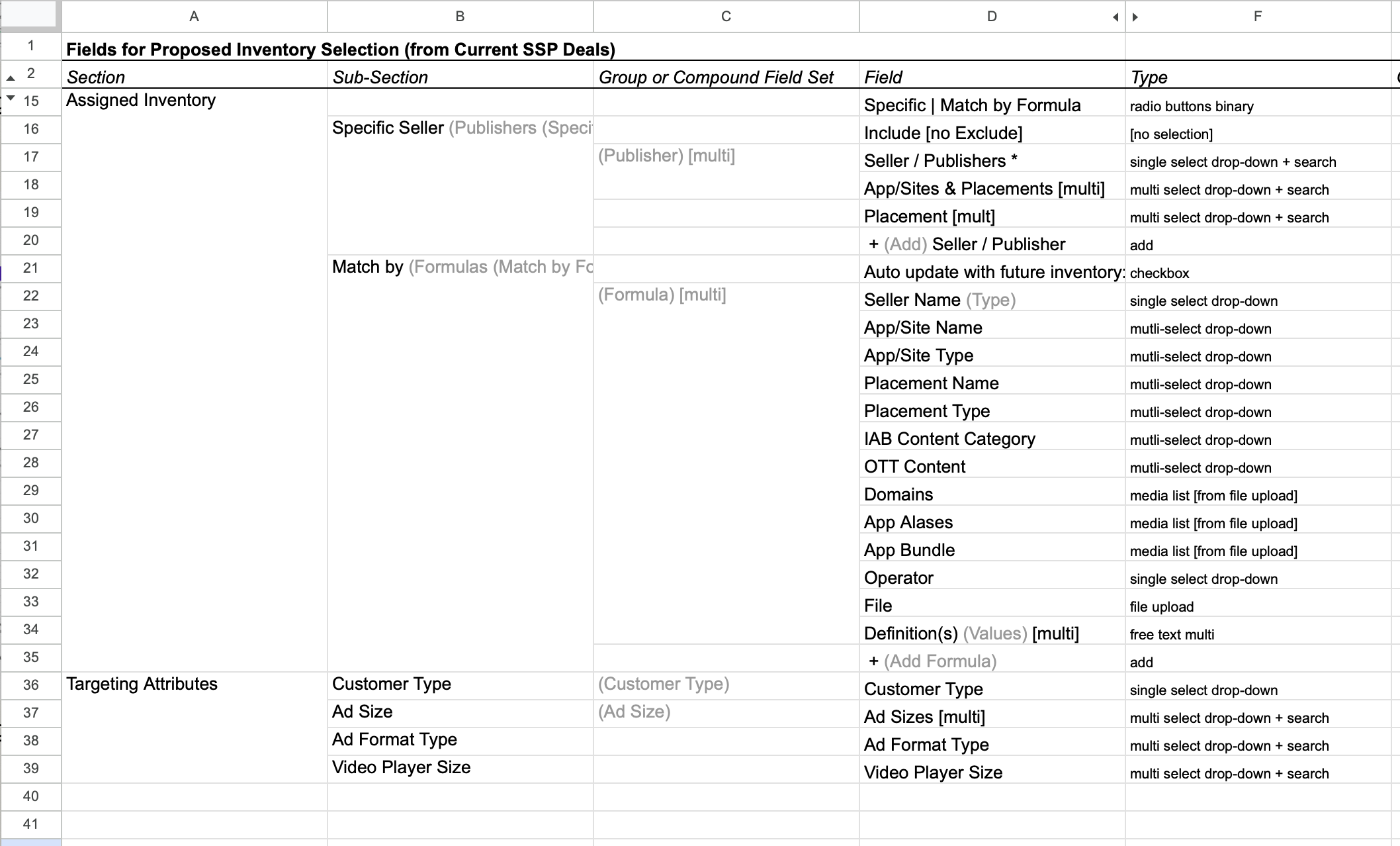
Teasing out relevant fields and values from SSP Deals, including Assigned Inventory and Targeting Attributes, from which to build out the new, omni-channel inventory model for all of Supply.
Additional objects, pages, and sections reviewed and indexed as part of this effort included Seller profiles, App/Site configuration pages, Bid Rules and Brand Safety Rules, Seller and App/Site performance dashboards, Inventory Attributes settings, and more.
Together with the fields and learnings from the OpenRTB model, as well as insights from user mental model research, these will form the basis of our new, integrated, omni-channel inventory and ad placement model, for all of Supply. (Deals page from SSP, with spreadsheet index, shown here)
Visual UI Diagrams & Index Spreadsheets
Mental Models: Mapping User Concepts of Ad Inventory
Challenge
Understanding how supply side users think about the ad inventory, content and media they manage every day, to power their monetization and optimization goals, based on insights from our user research interviews
Solution
Capturing the key categories and distinctions users employ to describe and differentiate between the various media types and ad formats they work with, as a starting point for building out a new, integrated model for ad placement types in supply platform UIs
Ad Formats and Media Types - Identifying a Range of User Mental Models
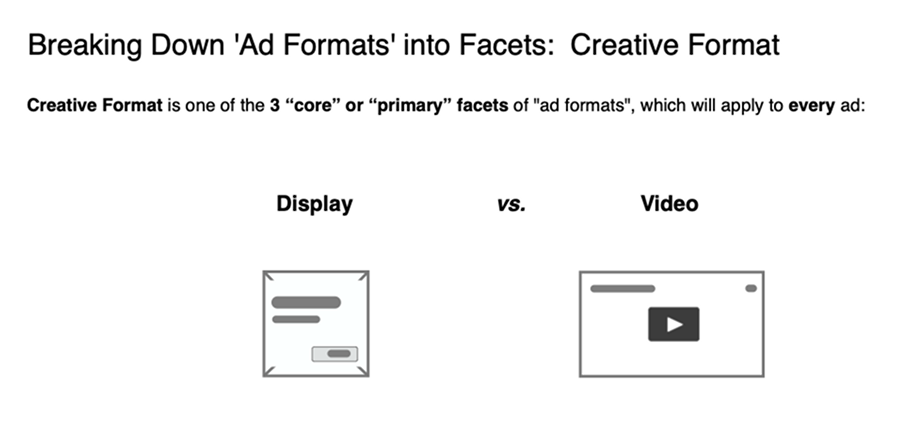
For a significant percentage of our users, both clients and internal, the ‘creative format’ of the ad / media - Display vs. Video ad - is understood as the primary defining attribute; this also reflects broader business silos across the industry, as well as our own platforms (display and mobile SSPs vs. video), and the types of clients (and associated business divisions within the organization) such as Publishers - offering primarily display, versus Broadcasters or Streaming Providers - offering video
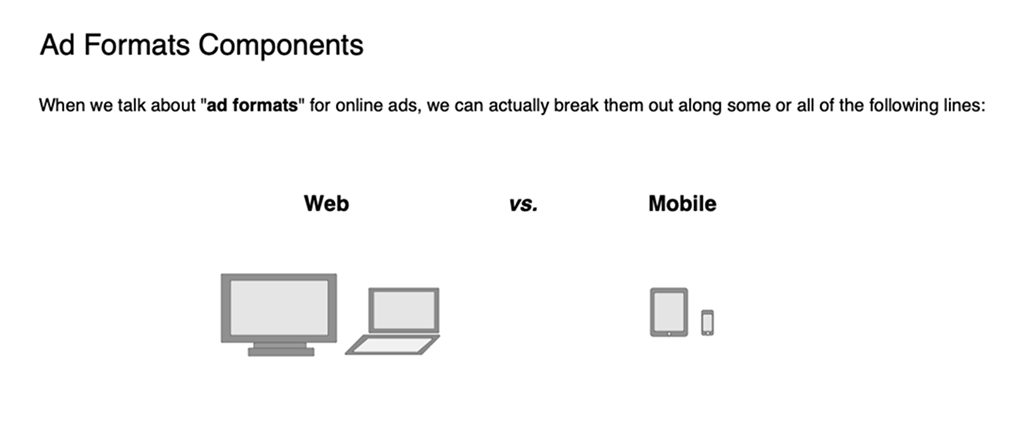
For those clients and internal users within the more heavily display-focused businesses (Publishers, App Developers, etc.) the primary distinction is overwhelmingly understood as Desktop vs. Mobile, with Publishers focused on both, and App Developers focused on mobile; in this context Video is a subordinate media type of either, which mostly populates display-type in-banner spaces (or in some cases in-article or out-stream formats), or may appear as an interstitial in a mobile app
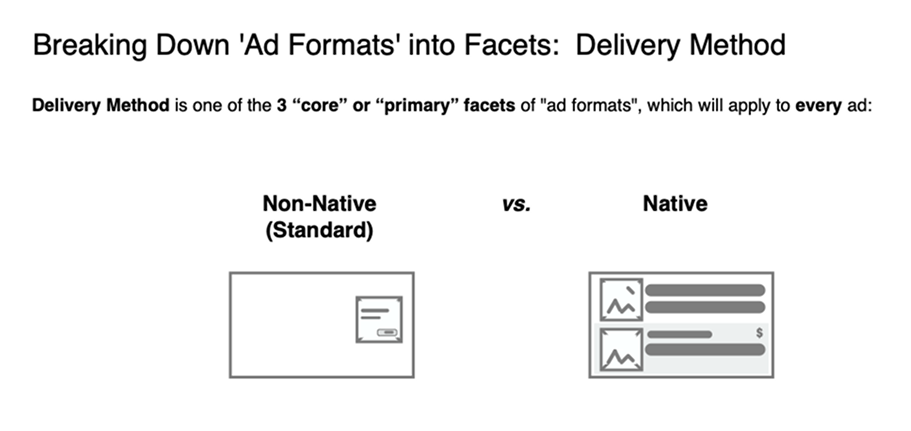
For a small but rapidly growing segment of our clients and users, the primary distinction is Native ads versus other (non-native) ad formats; this also reflects the broader expansion of native advertising within the industry, across all media, platform, and client types, as well as our own platforms and business units (native, recommendations, and search SSPs ), for this newly emerging ad type
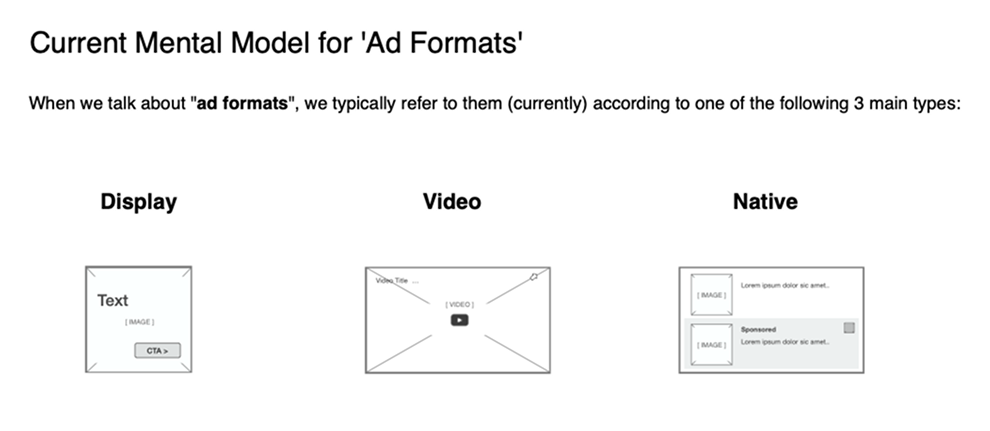
Taken together, our research findings suggested that the primary defining attributes or core distinctions for ad placements, media, and inventory, in the current landscape, are: Display, Video, or Native, with desktop vs. mobile, and mobile web vs. mobile app, still relevant, but secondary, distinctions, relating mostly to details like ad size, delivery protocols and file formats
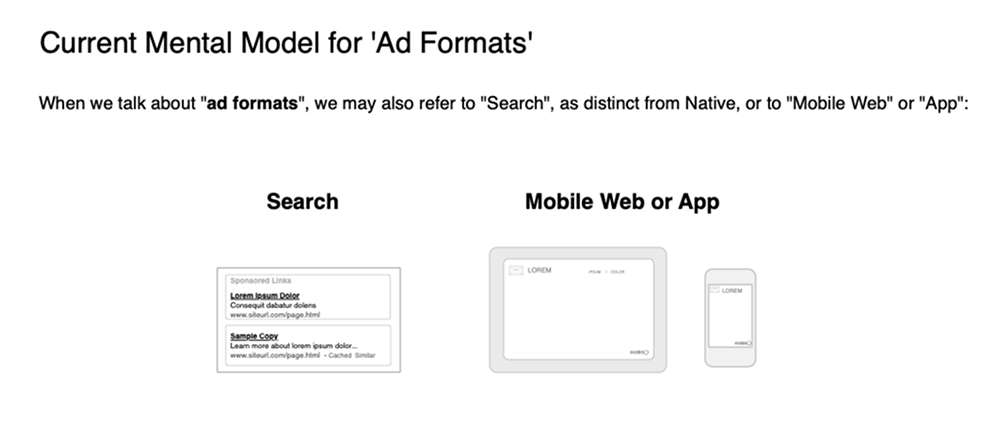
Search (while not currently part of the ad platform ecosystem our design and product teams support) is increasingly being conceived of as another type of Native format; desktop vs. mobile, and mobile web vs. mobile app are still relevant, but secondary, distinctions, after Display, Video, Native and Search
Ad Inventory, Media & Formats - Developing an ‘Omni-Channel’ Model
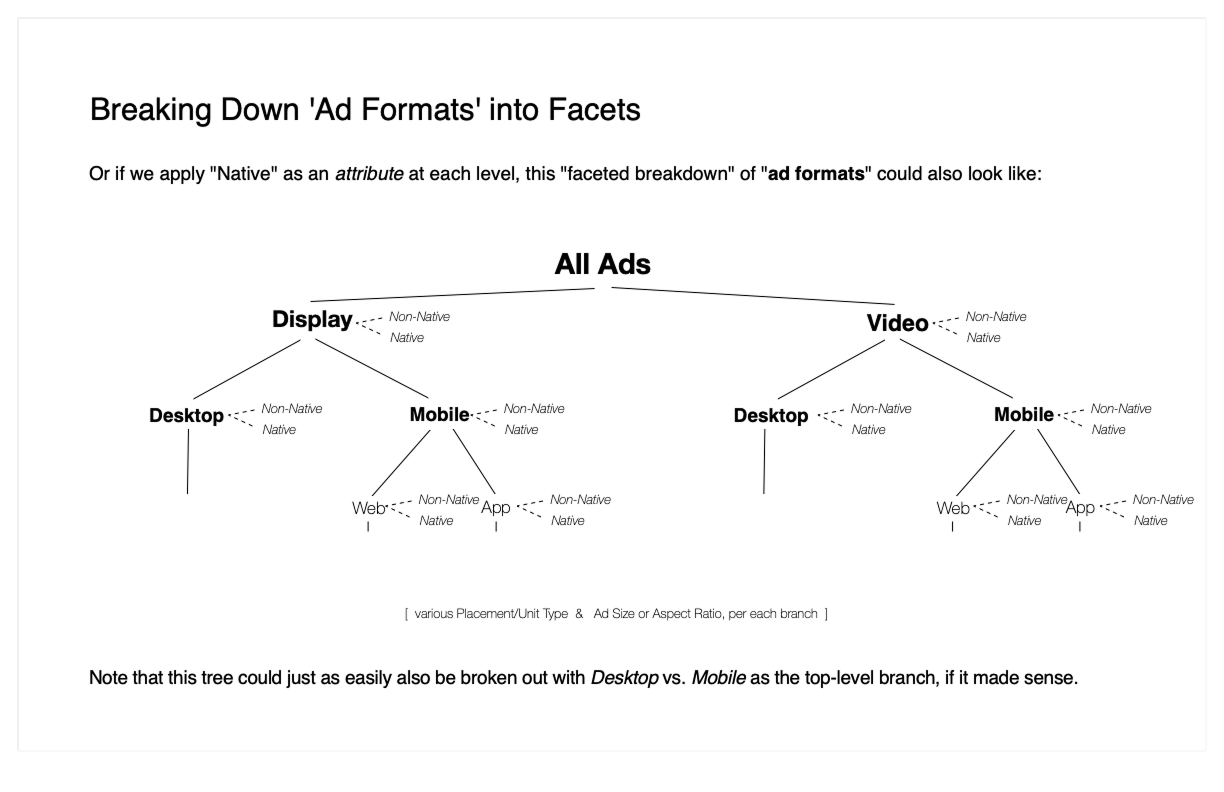
Faceted hierarchy of ad placements and inventory - Display vs. Video, Desktop vs. Mobile, and Mobile Web vs. Mobile App, with Native (vs. Standard / Non-Native) as a potential facet at any inventory level in the tree. (Note: this model does not yet incorporate emerging and rapidly ascending formats, such as Audio and Digital Out of Home (DOOH).
Using our findings on users’ mental models of their ad inventory to synthesize a single, integrated system (or faceted hierarchy) for how to best categorize and organize the array of placements within our various different ad platform UIs, according to types.
A range of models were proposed, in this example the primary distinction would be between Display and Video, which also aligns with a primary differentiator between different Seller types and their inventory, i.e. Publishers and App Developers whose inventory is predominantly Display vs. Broadcasters and Streaming Video Providers whose inventory is primarily Video; as well as with fairly major differences in technical parameters and specifications between these two inventory and placement types i.e. relatively simple Display / Banner specifications vs. the significantly lengthier array of parameters available ad required for Video.
A third factor, perhaps most practically relevant to our users in their day to day management and optimization efforts, is the significant difference between how pricing, bid parameters and metrics, and inventory packaging (Deals) are assigned, differently for Display vs. Video - Display banners are typically priced at a fraction of Video, bid pricing models for Display are typically cost per impression or click, whereas video typically also relies on metrics such as percent complete which don’t exist for Display, etc.
In this proposed model, Desktop vs. Mobile would live as secondary distinction under / within each of those two top-level categories, Display vs. Video, as applicable, with an additional tertiary distinction under Mobile of Web vs. App, for parameters unique to either (like banner or player size options, or technical configurations such as app SDKs, or other options available only for apps).
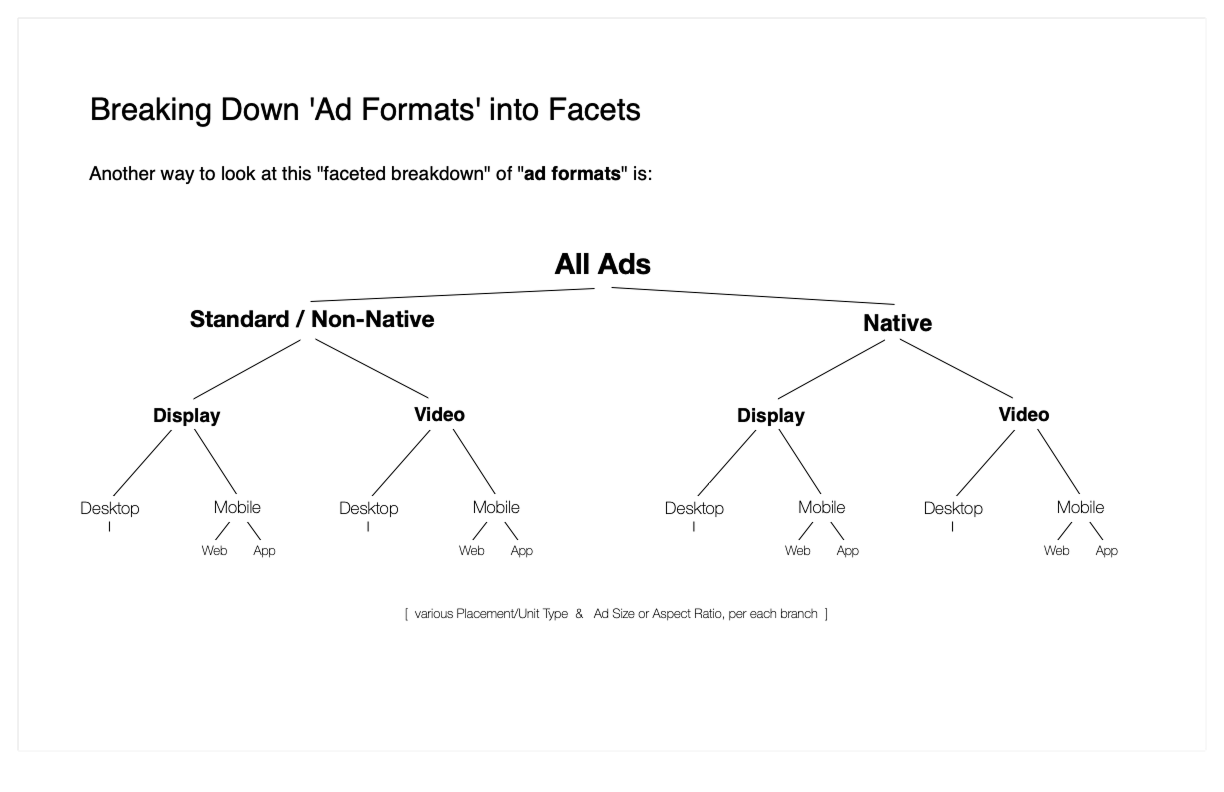
Faceted hierarchy of placements and inventory, alternative model - Standard (Non-Native) vs. Native, Display vs. Video, Desktop vs. Mobile, and Mobile Web vs. Mobile App.
In this alternative proposed model, the primary distinction for placements and inventory would be Native vs. Standard types of inventory. This aligned with some users’ mental models, based on the current state of the industry at this time - where Native was a heavily emerging but largely distinct / silo’d format, in terms of both Sellers who offer native and the ad tech platforms used to manage native inventory (i.e. our Native SSP).
Im this alternative model, the other key differentiators would live in two identical, parallel hierarchies for Display vs. Video, Desktop vs. Mobile, Web vs. App, etc., under the primary division of Native vs. Standard.
One potential downside to this model, however, is that it effectively reinforces present business and operational silos between today’s Sellers (and inventory), rather than encouraging cross-pollination, i.e. for more traditional Publishers, App Develops, ad Broadcasters to expand and grow into the Native space, by creating and offering more Native type placements, for example content recommendations placements, on their properties.
In addition, projections around the longer-term evolution of Native, as well as innovations in programmatic delivery methods in general, suggest that convergence across and among all ad formats is a likely future development, so that for example advancements in programmatic technologies like (AI-driven) targeting, creative variation, and optimization might eventually mean that a ‘traditional’ Display Banner may in future be composed of distinct fields and assets - like headings, calls-to-action, and image assets - that are ‘assembled ‘ programmatically in real time, much like Native assets are assembled to deliver an ad, today.
Concept Illustrations & Taxonomy Diagrams
Recommendation: A New Model for Ad Placements & Inventory for Supply
Challenge
Developing a new omni-channel model for ad placements and inventory that integrates all inventory and placement types into a single paradigm across Supply
Solution
Synthesizing insights from user research findings, the OpenRTB spec subject matter deep-dive, our analysis of today’s supply platform UIs, and our mapping of users’ mental models, to generate a simple, standardized, unified, and extensible model for ad inventory and placements
Ad Inventory & Placements - Integrated, Omni-Channel Model
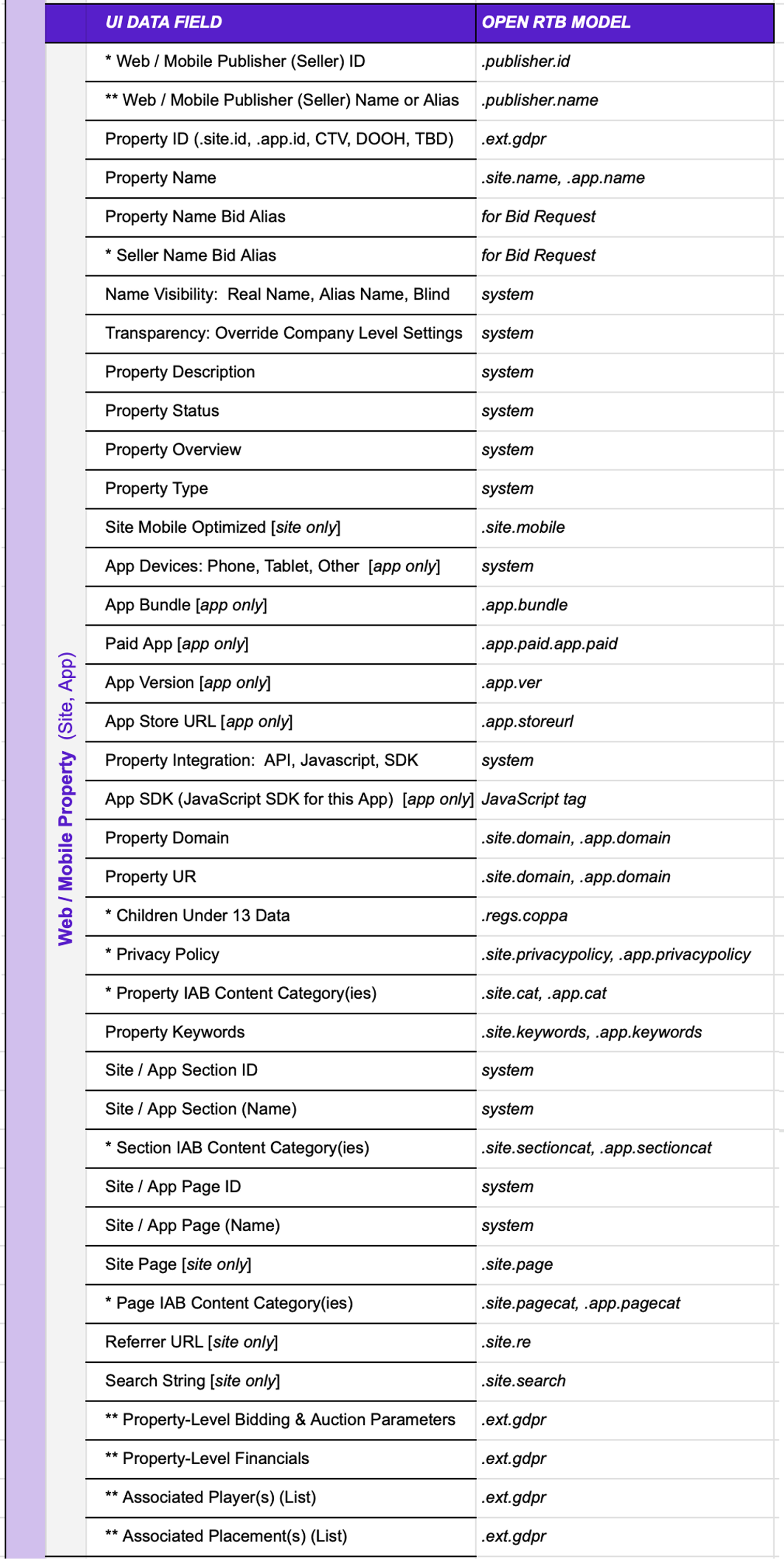
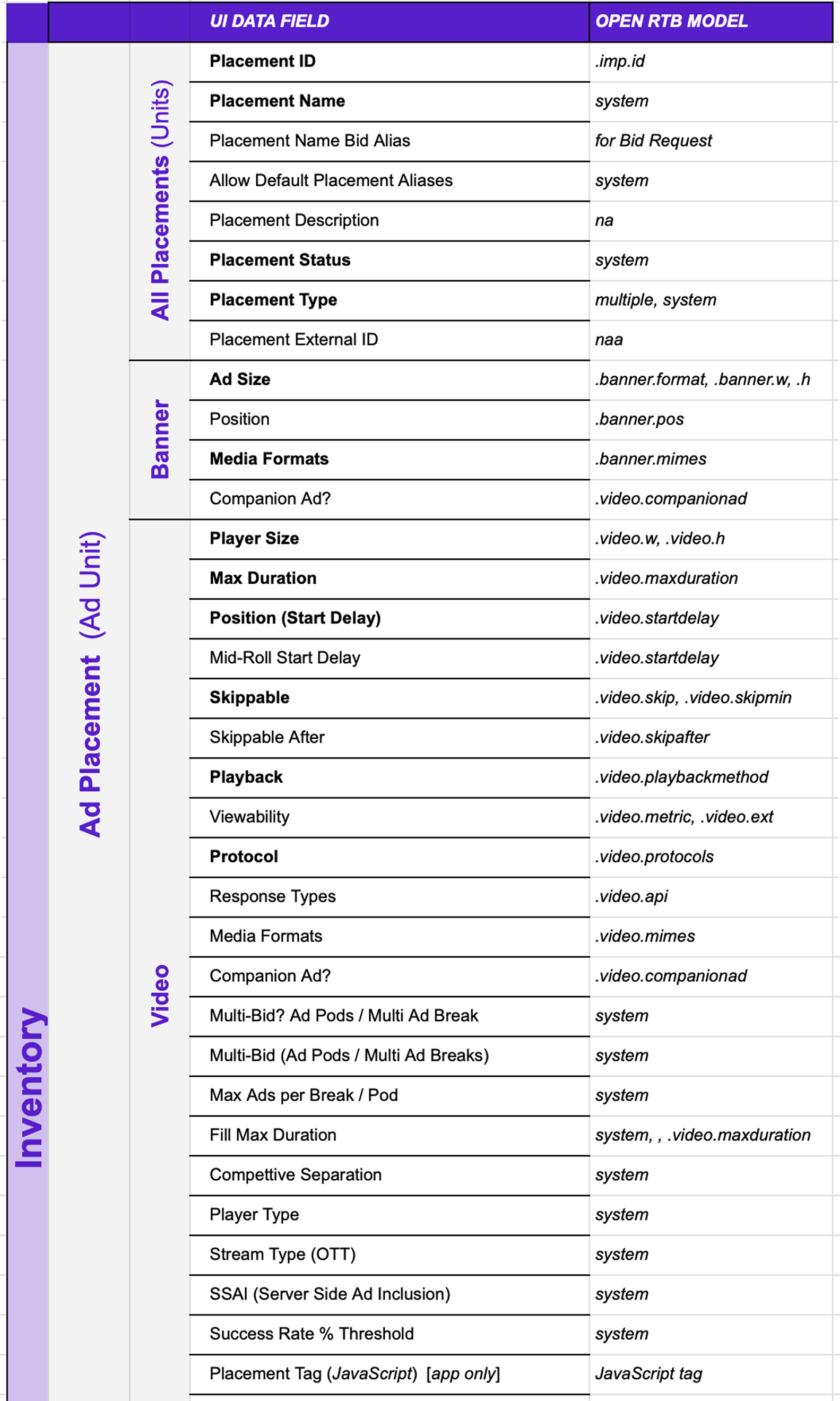

Developing a new omni-channel model for ad placements and inventory that integrates all necessary fields and parameters from each of the different inventory and placement types, and platform UIs in today’s supply ecosystem, into a single system.
The model was developed by synthesizing insights from the users’ mental model research, OpenRTB analysis, and platform UI deep-dive assessment and indexing.
The model was built out tactically by mapping the objects and attributes from the OpenRTB Bid Model to the records, data fields, and field values from today’s supply platform UIs, and grouping and ordering these according to the primary business categories based on user mental models, such as the Placement and Inventory Types, as well as categories such as Content, Quality & Safety, Data/Privacy & Children (as shown here).
The index (spreadsheet) captures every data field, across all Supply platforms, that applies to inventory and ad placements, at all levels.
The index presents a new, universal naming and labeling convention for these data fields, that can be applied across platform UIs, and indicates (where applicable) where and how each field maps back to the OpenRTB spec (as shown here). (The index also indicates how each field item on this universal list of data fields and labels maps back to the various similarly (or differently) labeled, parallel / analogous field(s), in each of the different Supply platform UIs.)
The model was designed to apply universally across all sellers, inventory, and placements types.
The objective was to come away with an inventory and placement model that could be applied universally across all of today’s supply platforms, and that would extend to and accommodate all inventory types and ad placement formats.
Inventory & Placements Model - Illustrating How it Maps to Fields & Values in the UI
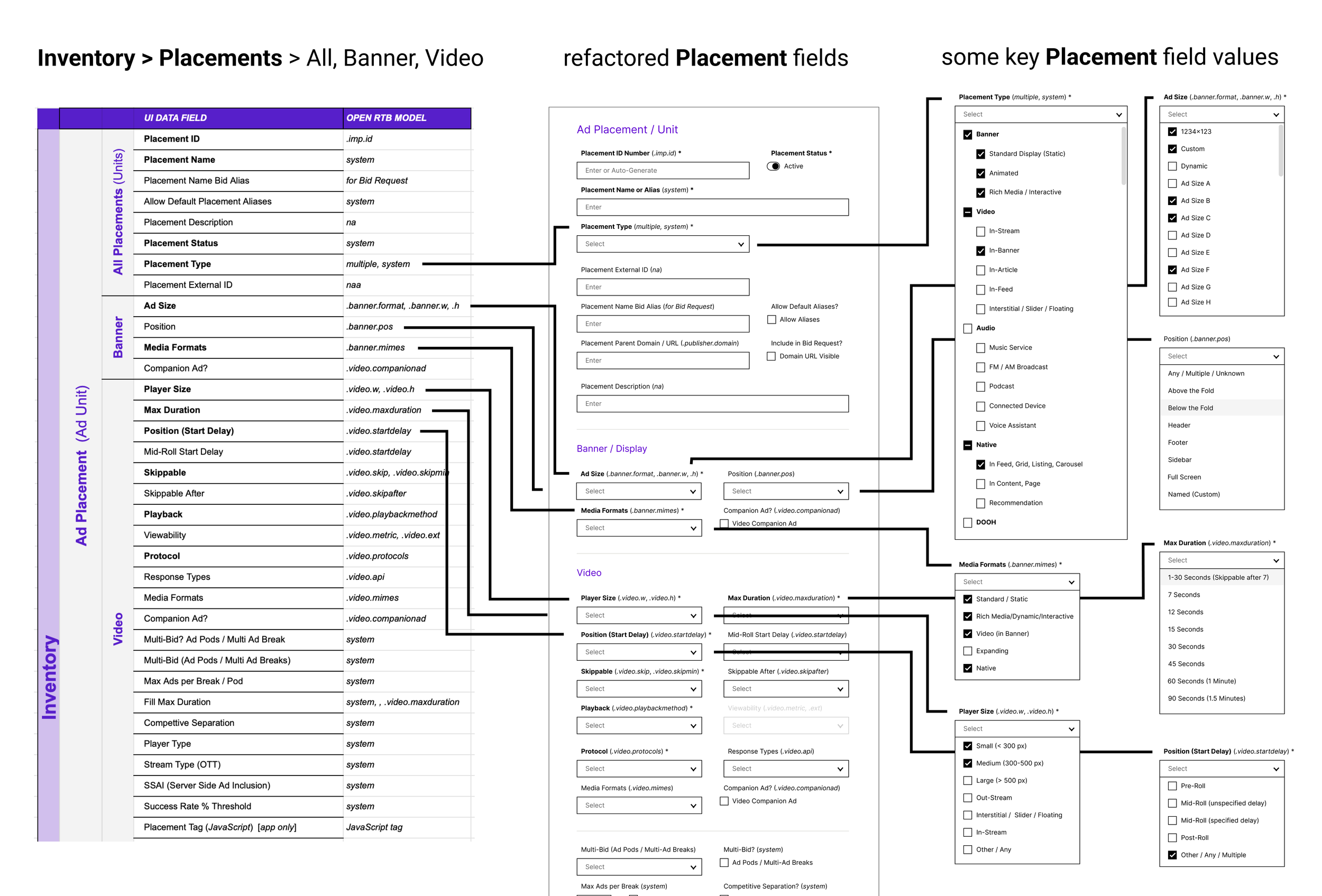
Deploying a new omni-channel inventory and ad placements model, for all inventory and placement types, across all Supply platforms.
Creating an ad placement / ad unit specification that applies universally to all channels, media, and inventory, and all ad formats including: Banner and Video, as well as Audio, Native, and DOOH (not shown).
Diagram (shown) illustrates how the index (spreadsheet), capturing the full range of inventory and placement data fields and values (and mapping to OpenRTB fields and parameters), and grouping them according to business categories (based on user mental model models), maps to the current and proposed fields and values in the UIs - also grouped according to the same business categories, and also indicating which OpenRTB field(s) the data field maps to (where applicable).
Spreadsheet & Wireframes
UI Refactoring: ‘Ad Placement’ Page in SSP According to New Unified Model of Ad Inventory & Placements
Challenge
Ad Placements in SSP and other Supply platform UIs have evolved over time, but lack consistency, clarity, and cohesion / alignment across platforms, inventory and placement types
Solution
Applying the new, omni-channel ad placements model to refactor the current Placements page in the SSP, as a first step towards cross-platform alignment (and integration)
Ad Placement - Current Page in Today’s SSP UI
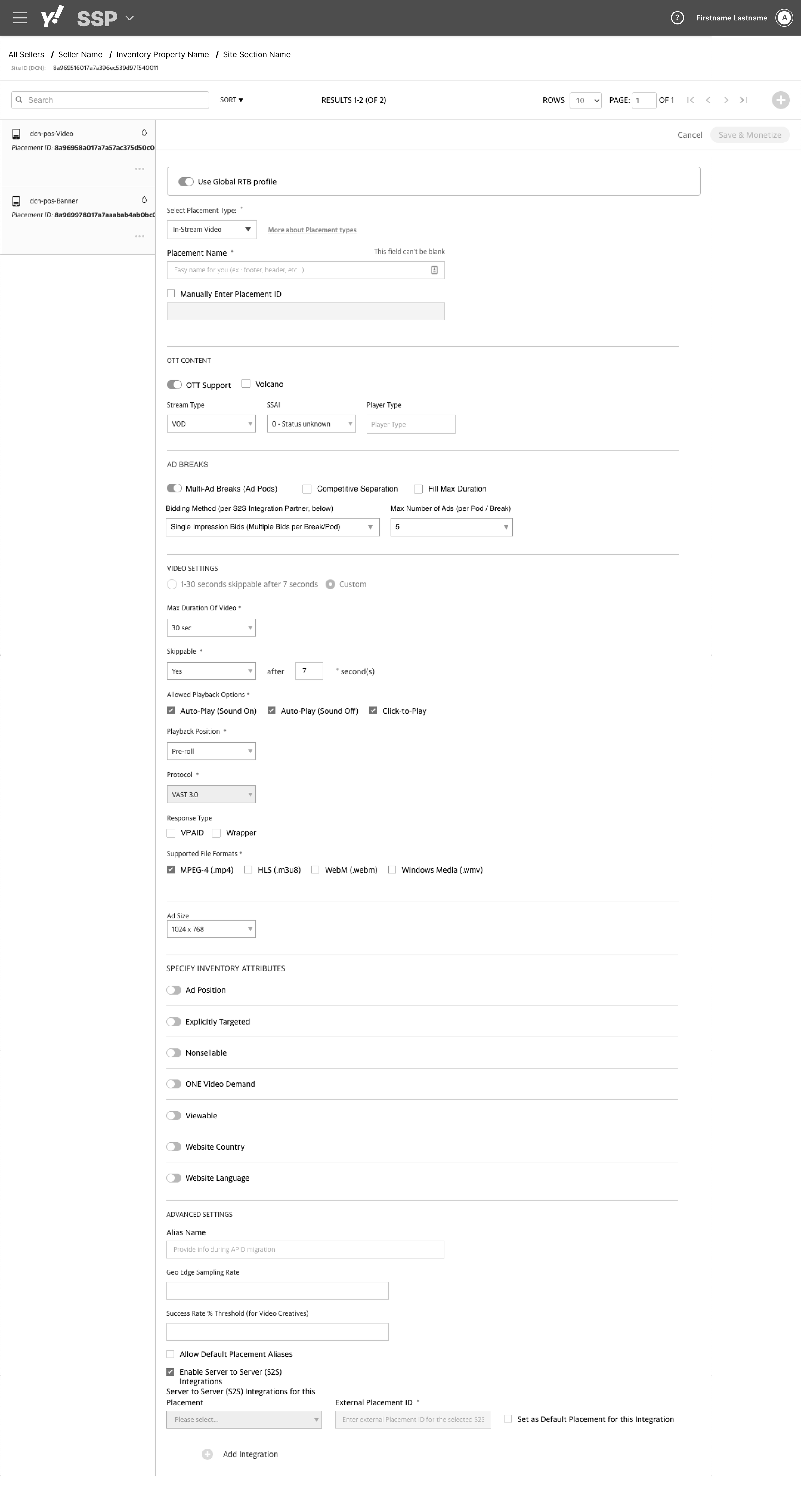
Current Ad Placement page in the SSP exemplifies how the platform and UI has evolved organically over time, through numerous incremental feature and functional enhancement roll-outs, and following various shifting design directions, layout conventions, and overall UI standards, over the duration of the platform’s history.
As a result of this history, the Placement page - and indeed most of the SSP, as well as our other Supply platform UIs - falls short in terms of expected consistency, clarity, and alignment: a) internally within the page itself, b) laterally in relation to the other sections and pages within the SSP UI, and c) globally within the broader scope of all our other Supply platforms.
While this page was initially designed for defining mobile banner / display ads, its scope and purpose has grown over time to include all banner / display inventory (mobile site, mobile app, and web), as well as both short- and long-form video inventory and ad formats; and now it is currently undergoing additional enhancements for emerging formats such as Native and DOOH.
To accommodate this ongoing evolution of the page (and the platform), in terms of the kinds of inventory it accommodates and the ad placement types available, updates are needed. The goal is to expand the scope of today’s Ad Placement page to more effectively (and universally) accommodate placements and inventory across all sellers, inventory, and placements types.
(Additional opportunities for UI refinement also exist, including standardizing design patterns, layout conventions, and overall UI standards, within the page and in the context of the wider SSP platform UI.)
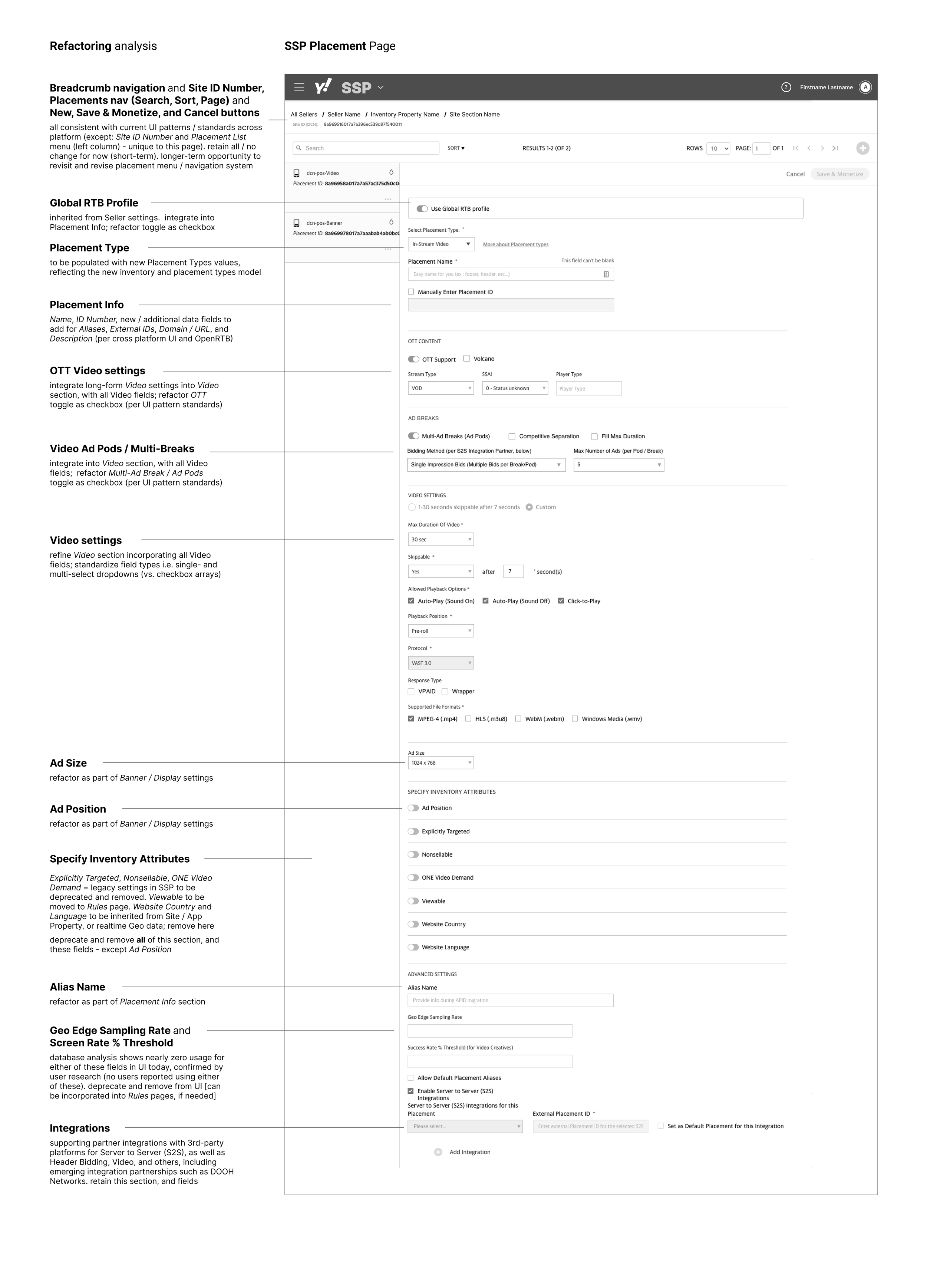
New Refactored Ad Placement Page - for SSP UI Based on Integrated, Omni-Channel Model
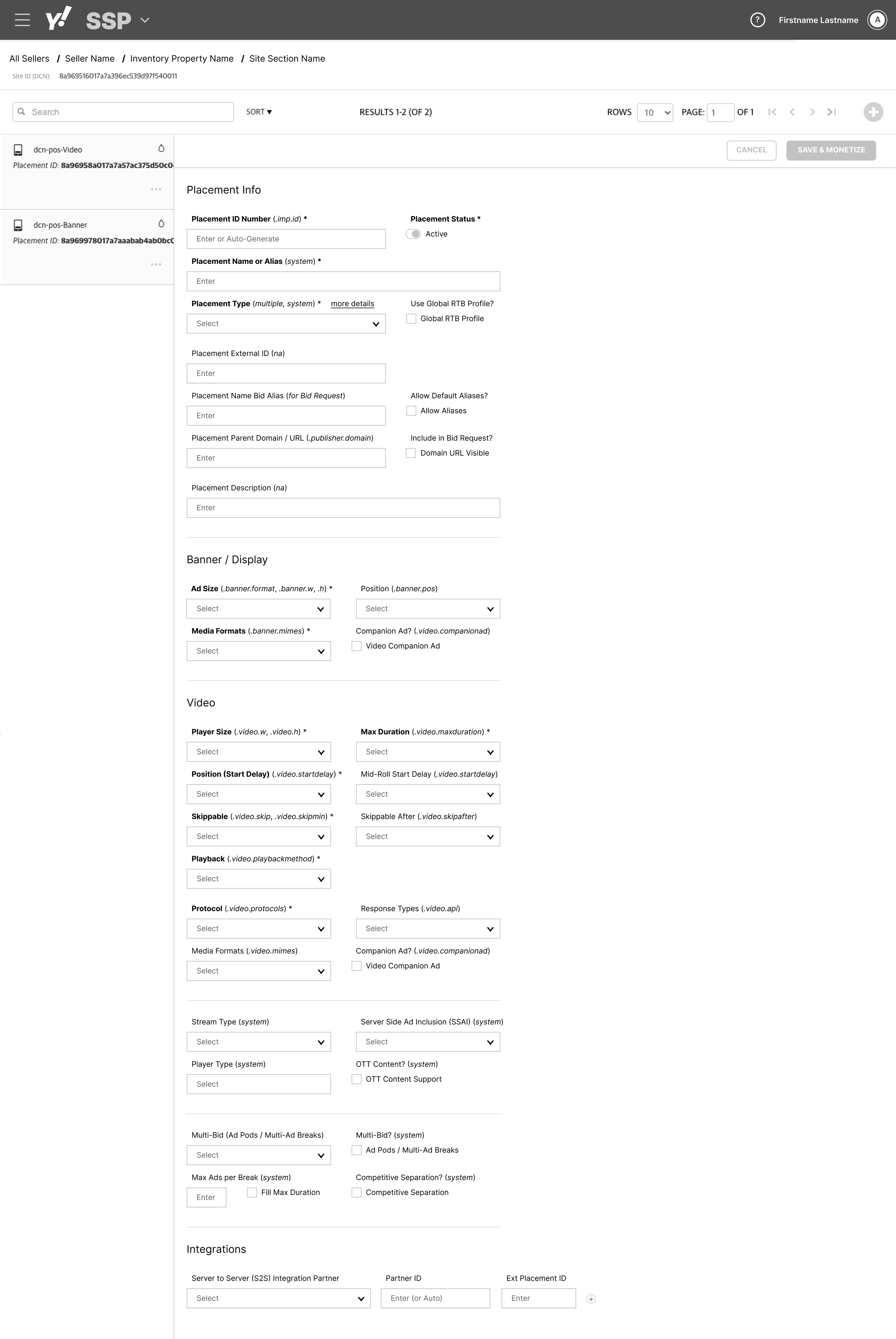
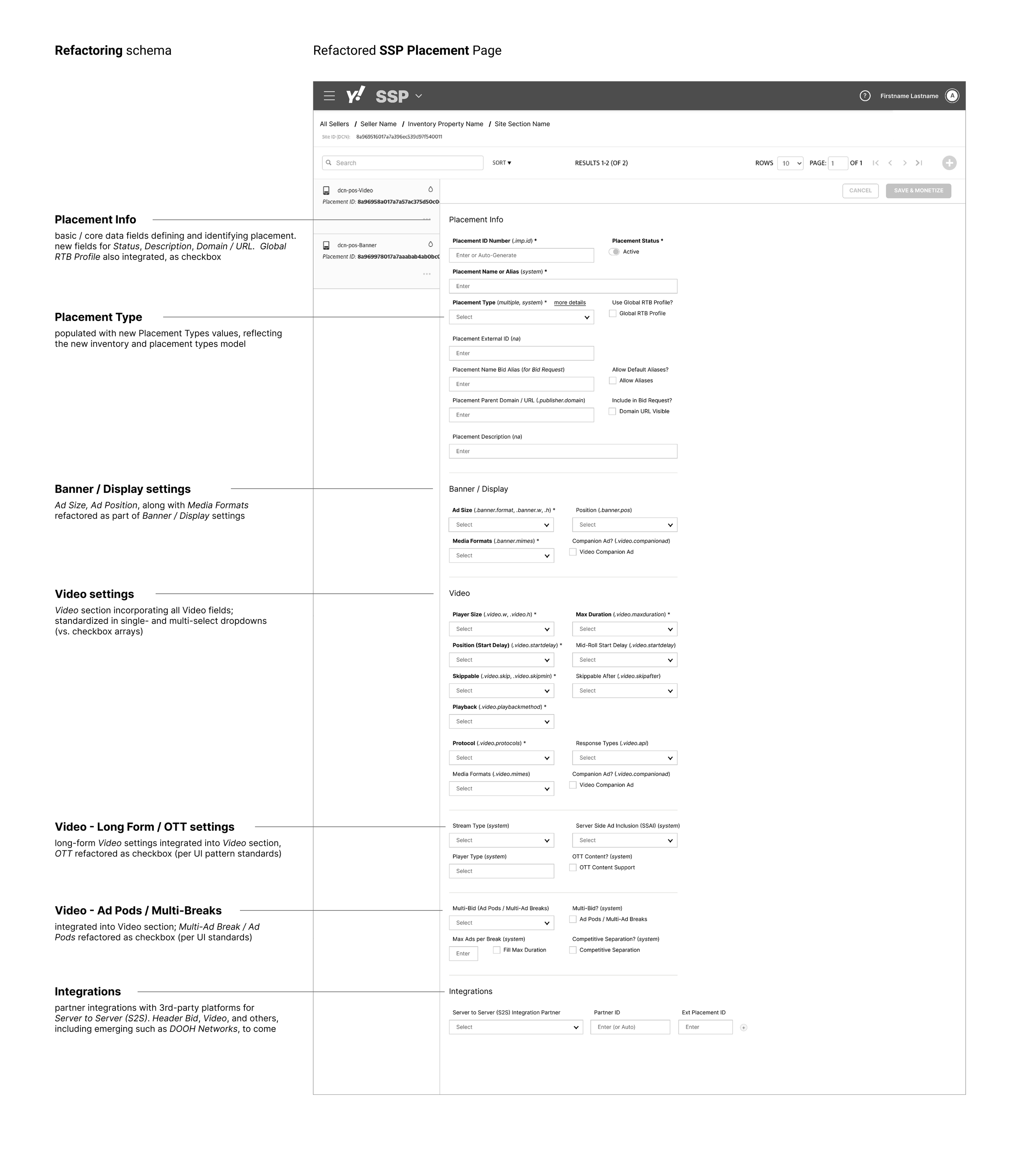

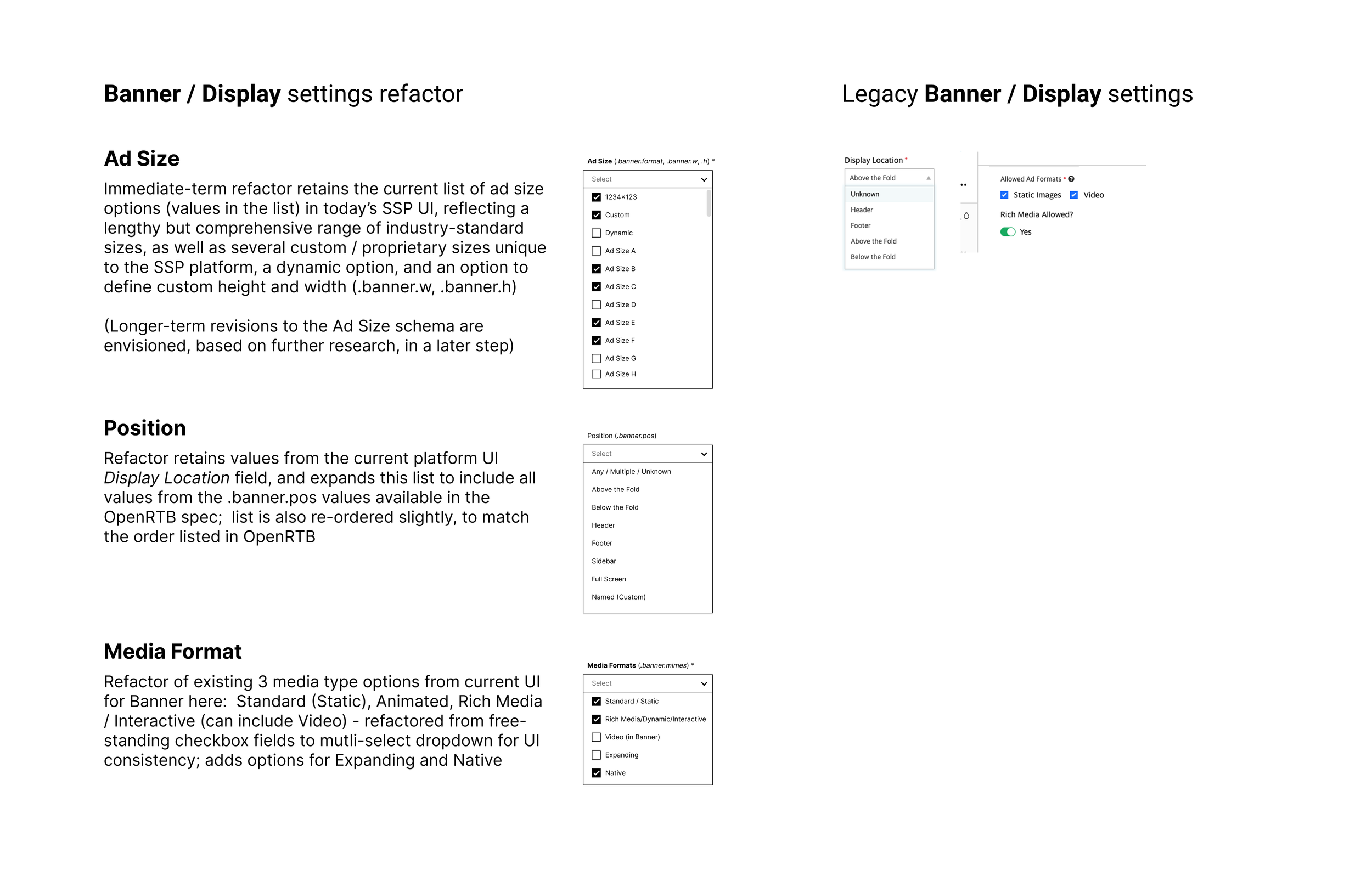
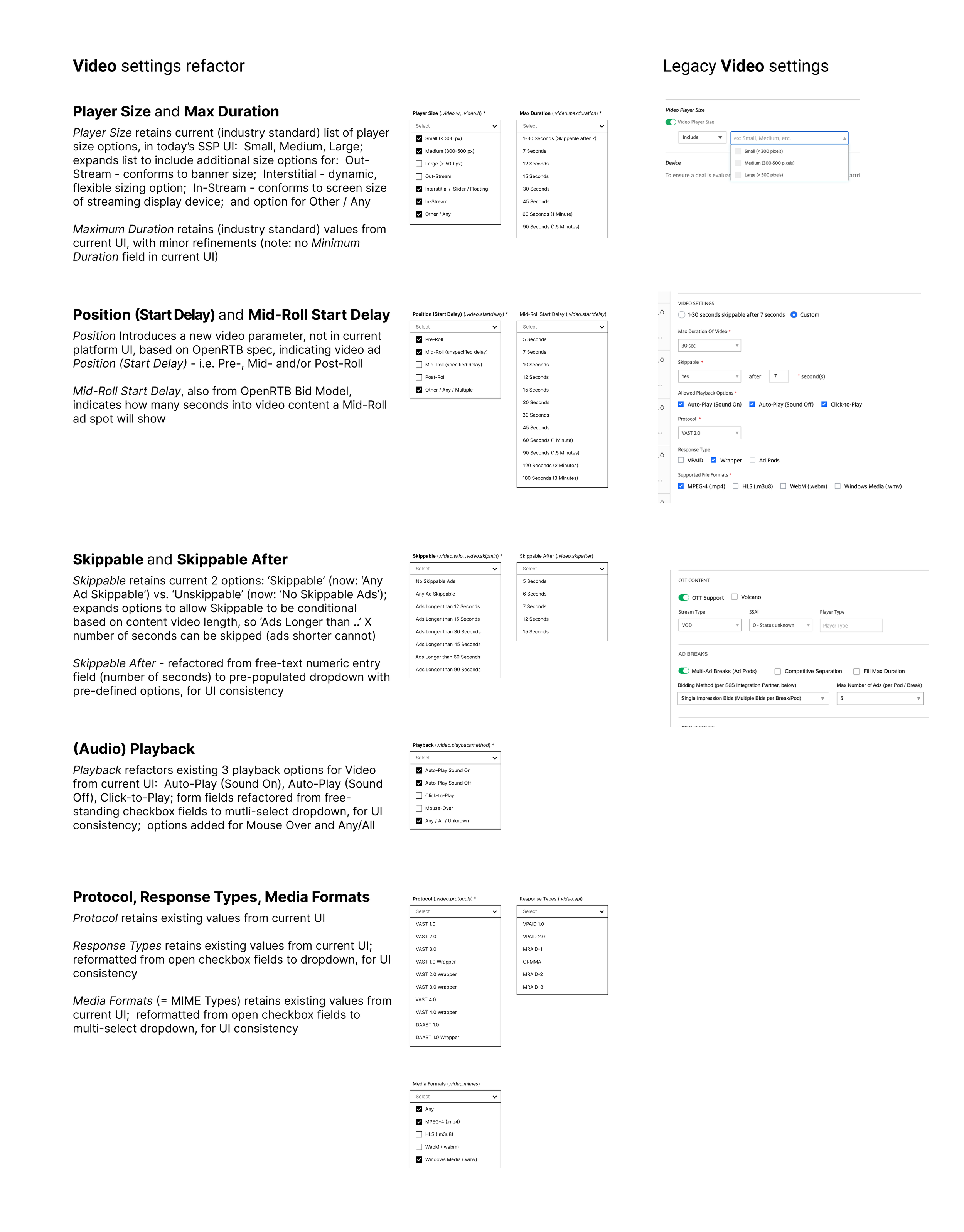
The refactored page re-orders and groups fields according to the categories in the new omni-channel inventory and ad placements model, for all inventory and placement types, with sections broken out and clearly labeled for Placement Info, Banner / Display, Video, and Integrations.
The refactored page also includes updates and revisions to field labeling conventions and terminology, to reflect the new system of labeling, ordering, and grouping aligned across all Supply platforms / UIs, and across all inventory and placement types, based on the new inventory and placements model.
(Additional refinements were also made to some of the existing fields and affordances, such as check boxes, toggles, and similar, to better standardize these, and improve consistency and clarity of function, in the UI.)
This refactoring is the first of several steps toward creating and implementing a single ad placement / ad unit specification page that can be used to create and define placements for any and all channels, media, and inventory, and all ad formats including: Banner and Video, as well as Audio, Native, and DOOH (not shown).
The page refactoring shown here is the Placement page from the main SSP UI, but this approach is envisioned for roll-out (as appropriate, based on product roadmaps and priorities) across all Supply platforms. Future evolution of the page is envisioned to include additional sections broken out for the additional inventory / placement types included in the model, namely Audio, Native, and Digital Out of Home (DOOH).
Wireframes